|
Contro
|
 |
« on: July 06, 2012, 04:56:12 PM » |
|
Create a file list from multiple folders I would like a soft for propose the folders. Then I can obtain a list with the files sorted : by creation or modification date by alphabetical order Not include the system files Include de subfolders contained in the proposed folders. Best Regards 
|
|
|
|
|
Logged
|
|
|
|
|
rgdot
|
 |
« Reply #1 on: July 06, 2012, 10:56:48 PM » |
|
|
|
|
|
|
Logged
|
|
|
|
|
barney
|
 |
« Reply #2 on: July 07, 2012, 12:57:58 AM » |
|
I'm not certain I understand all your requirements, but you might take a look at the late Karen Kenworthy's Directory Printer. It's extremely flexible. I use it frequently to create CSV files for folders/subfolders content. It's a VB6 program, so if you're using windows, you prolly have all the necessaries already installed.
|
|
|
|
|
Logged
|
Make a good day ... barn
|
|
|
|
|
Renegade
|
 |
« Reply #3 on: July 07, 2012, 02:31:41 AM » |
|
Far less sophisticated, but a quick and easy hack for a recursive text dump of a directory and files: http://renegademinds.com/...les/tabid/56/Default.aspxDump file and directory lists to text files Need a complete list of files and directories from Windows? Don't feel like typing them manually? Here's the answer... The following is a batch file that runs under command.exe or cmd.exe, depending upon whether you are using Windows 9x/Me or Windows NT/2000/XP/2003. Copy the file contents then save it in your SendTo directory as getDirListing.bat. In Windows NT/2000/XP/2003 the SendTo directory is in <DRIVE>:\Documents and Settings\<YOUR WINDOWS LOGIN>\SendTo. Formatted for Generic Code with the GeSHI Syntax Highlighter [ copy or print] @echo Directory and sub -directory file listing dump by RenegadeMinds .com . @echo Visit http ://Renegademinds.com for more Windows tips and tricks @echo and free software applications . @echo ================================================================== @echo ================================================================== @echo Save this file as getDirList .bat in your SendTo directory . @echo SendTo is under Documents and Settings in each user 's directory. @echo Right-click on any directory in Windows Explorer and choose @echo Send To - getDirList.bat @echo ================================================================== @echo ================================================================== @echo Dumping directory listing to c:\dirListing.txt @echo (This may take some time for large directory trees.) @REM the /A switch lists all hidden and system files as well. @REM the /S switch lists all subdirectories and their contents. @dir %1 /A /S > c:\dirListing.txt @echo Opening c:\dirListing.txt in Notepad (Close notepad to delete file) @notepad c:\dirListing.txt @echo Deleting c:\dirListing.txt @del c:\dirListing.txt @pause
Right-click on any directory and choose SendTo > getDirListing.bat. Cheers, Renegade It goes in the "Send to" menu in your context menu. But like I said, far less sophisticated. The only real benefit is that it is fast, easy, and you don't need to bother opening any software for it.
|
|
|
|
|
Logged
|
|
|
|
|
Contro
|
 |
« Reply #4 on: July 07, 2012, 04:35:53 AM » |
|
Running to try
Best Regards
|
|
|
|
|
Logged
|
|
|
|
|
Contro
|
 |
« Reply #5 on: July 07, 2012, 04:54:41 AM » |
|
I see only give the possibility to choose one folder (and his subfolders). Is it correct ? I would in F4 the possibility to choose more than one folder. Best Regards
|
|
|
|
|
Logged
|
|
|
|
|
4wd
|
 |
« Reply #6 on: July 07, 2012, 06:10:12 AM » |
|
You'd need a separate batch file for each case and change the dir command in each: @dir %1 /A-s-h-d /S /on /b > c:\dirListing.txt ** For sorted by Name with no Folders or System/Hidden files @dir %1 /A-s-h-d /S /od /tc /b > c:\dirListing.txt ** For sorted by Creation Date with no Folders or System/Hidden @dir %1 /A-s-h-d /S /od /tw /b > c:\dirListing.txt ** For sorted by Last Written, (Modified), with no Folders or System/Hidden Use /o-n or /o-d to reverse the sort order.
|
|
|
|
« Last Edit: July 24, 2012, 11:53:08 PM by 4wd; Reason: Forgot to neg each attribute :/ »
|
Logged
|
Four wheel drive: Helping you get stuck faster, harder, further from help...........and it's no different on this forum 
|
|
|
|
Contro
|
 |
« Reply #7 on: July 07, 2012, 07:12:41 AM » |
|
I'm not certain I understand all your requirements, but you might take a look at the late Karen Kenworthy's Directory Printer. It's extremely flexible. I use it frequently to create CSV files for folders/subfolders content. It's a VB6 program, so if you're using windows, you prolly have all the necessaries already installed. I think i have the same problem. I can't select only one folder (and its subfolders), but I don't see how to select several folders in differents hard drives. Best Regards
|
|
|
|
|
Logged
|
|
|
|
|
Contro
|
 |
« Reply #8 on: July 07, 2012, 07:19:49 AM » |
|
Far less sophisticated, but a quick and easy hack for a recursive text dump of a directory and files: http://renegademinds.com/...les/tabid/56/Default.aspxDump file and directory lists to text files Need a complete list of files and directories from Windows? Don't feel like typing them manually? Here's the answer... The following is a batch file that runs under command.exe or cmd.exe, depending upon whether you are using Windows 9x/Me or Windows NT/2000/XP/2003. Copy the file contents then save it in your SendTo directory as getDirListing.bat. In Windows NT/2000/XP/2003 the SendTo directory is in <DRIVE>:\Documents and Settings\<YOUR WINDOWS LOGIN>\SendTo. Formatted for Generic Code with the GeSHI Syntax Highlighter [ copy or print] @echo Directory and sub -directory file listing dump by RenegadeMinds .com . @echo Visit http ://Renegademinds.com for more Windows tips and tricks @echo and free software applications . @echo ================================================================== @echo ================================================================== @echo Save this file as getDirList .bat in your SendTo directory . @echo SendTo is under Documents and Settings in each user 's directory. @echo Right-click on any directory in Windows Explorer and choose @echo Send To - getDirList.bat @echo ================================================================== @echo ================================================================== @echo Dumping directory listing to c:\dirListing.txt @echo (This may take some time for large directory trees.) @REM the /A switch lists all hidden and system files as well. @REM the /S switch lists all subdirectories and their contents. @dir %1 /A /S > c:\dirListing.txt @echo Opening c:\dirListing.txt in Notepad (Close notepad to delete file) @notepad c:\dirListing.txt @echo Deleting c:\dirListing.txt @del c:\dirListing.txt @pause
Right-click on any directory and choose SendTo > getDirListing.bat. Cheers, Renegade It goes in the "Send to" menu in your context menu. But like I said, far less sophisticated. The only real benefit is that it is fast, easy, and you don't need to bother opening any software for it. I can't filter ? I have too many hard drives and some 2 Tb. Best Regards
|
|
|
|
|
Logged
|
|
|
|
|
Contro
|
 |
« Reply #9 on: July 07, 2012, 07:23:02 AM » |
|
I would like only files , not shortcuts inside subfolders only folder and subfolders and the file names sorted But all the folders in several hard drives please.  Best Regards
|
|
|
|
|
Logged
|
|
|
|
|
Contro
|
 |
« Reply #10 on: July 07, 2012, 07:51:54 AM » |
|
Far less sophisticated, but a quick and easy hack for a recursive text dump of a directory and files: http://renegademinds.com/...les/tabid/56/Default.aspxDump file and directory lists to text files Need a complete list of files and directories from Windows? Don't feel like typing them manually? Here's the answer... The following is a batch file that runs under command.exe or cmd.exe, depending upon whether you are using Windows 9x/Me or Windows NT/2000/XP/2003. Copy the file contents then save it in your SendTo directory as getDirListing.bat. In Windows NT/2000/XP/2003 the SendTo directory is in <DRIVE>:\Documents and Settings\<YOUR WINDOWS LOGIN>\SendTo. Formatted for Generic Code with the GeSHI Syntax Highlighter [ copy or print] @echo Directory and sub -directory file listing dump by RenegadeMinds .com . @echo Visit http ://Renegademinds.com for more Windows tips and tricks @echo and free software applications . @echo ================================================================== @echo ================================================================== @echo Save this file as getDirList .bat in your SendTo directory . @echo SendTo is under Documents and Settings in each user 's directory. @echo Right-click on any directory in Windows Explorer and choose @echo Send To - getDirList.bat @echo ================================================================== @echo ================================================================== @echo Dumping directory listing to c:\dirListing.txt @echo (This may take some time for large directory trees.) @REM the /A switch lists all hidden and system files as well. @REM the /S switch lists all subdirectories and their contents. @dir %1 /A /S > c:\dirListing.txt @echo Opening c:\dirListing.txt in Notepad (Close notepad to delete file) @notepad c:\dirListing.txt @echo Deleting c:\dirListing.txt @del c:\dirListing.txt @pause
Right-click on any directory and choose SendTo > getDirListing.bat. Cheers, Renegade It goes in the "Send to" menu in your context menu. But like I said, far less sophisticated. The only real benefit is that it is fast, easy, and you don't need to bother opening any software for it. Renegade thanks for the application email avenger. I was looking for the application. Best Regards
|
|
|
|
|
Logged
|
|
|
|
|
Renegade
|
 |
« Reply #11 on: July 08, 2012, 11:14:36 AM » |
|
You'd need a separate batch file for each case and change the dir command in each: @dir %1 /A-shd /S /on /b > c:\dirListing.txt ** For sorted by Name with no Folders or System/Hidden files @dir %1 /A-shd /S /od /tc /b > c:\dirListing.txt ** For sorted by Creation Date with no Folders or System/Hidden @dir %1 /A-shd /S /od /tw /b > c:\dirListing.txt ** For sorted by Last Written, (Modified), with no Folders or System/Hidden Use /o-n or /o-d to reverse the sort order. I never sort as the default is fine for what I need, but thanks for that!  I can't filter ?
I have too many hard drives and some 2 Tb.
You just right-click on a folder, so you don't need to do EVERYTHING. Cripes... that would take forever...  Renegade thanks for the application email avenger. I was looking for the application.
It's a bit dated now.  Likely doesn't work as well as when I wrote it.
|
|
|
|
|
Logged
|
|
|
|
|
4wd
|
 |
« Reply #12 on: July 08, 2012, 09:49:51 PM » |
|
You'd need a separate batch file for each case and change the dir command in each:
@dir %1 /A-shd /S /on /b > c:\dirListing.txt ** For sorted by Name with no Folders or System/Hidden files @dir %1 /A-shd /S /od /tc /b > c:\dirListing.txt ** For sorted by Creation Date with no Folders or System/Hidden @dir %1 /A-shd /S /od /tw /b > c:\dirListing.txt ** For sorted by Last Written, (Modified), with no Folders or System/Hidden
Use /o-n or /o-d to reverse the sort order.
I never sort as the default is fine for what I need, but thanks for that!  I screwed up, it's /A-s-h-d to exclude System/Hidden/Directories - I forgot you had to neg each one. 
|
|
|
|
|
Logged
|
Four wheel drive: Helping you get stuck faster, harder, further from help...........and it's no different on this forum 
|
|
|
|
4wd
|
 |
« Reply #13 on: July 24, 2012, 11:48:09 PM » |
|
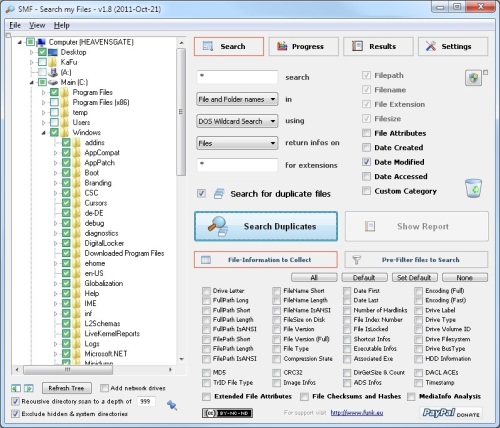
I was actually writing something to do this but found I didn't need to: SMF by Kafu It has excessive search filter capabilities and a SQLite driven result reporting tool, with which you can sub-filter the results according to your needs.  It's fast and it does indeed have excessive filtering - a universe ahead of anything I could have written   1. Select your directories 2. Specify any filename filtering and check the Attributes, Date Created/Modified. 3. Click Pre-filter files. 4. Uncheck System, Hidden, Directory, etc. 5. Click Search.  6. Click Show report and again on the next window.  You can sort by clicking on the column.
|
|
|
|
|
Logged
|
Four wheel drive: Helping you get stuck faster, harder, further from help...........and it's no different on this forum 
|
|
|
|
IainB
|
 |
« Reply #14 on: July 25, 2012, 04:44:31 AM » |
|
@4wd: Thanks for the link - looks like an interesting find in its own right, as well as being a possible solution to the problem posed by @Contro.  Downloading it now... EDIT 2012-07-25 2219hrs: I took a look around that website - http://funk.eu/. Very interesting software and other stuff - e.g., on the blog, a link to this superb trick cyclist video:
|
|
|
|
« Last Edit: July 25, 2012, 05:25:39 AM by IainB; Reason: Added YouTube link. »
|
Logged
|
|
|
|
|
x16wda
|
 |
« Reply #15 on: July 28, 2012, 06:56:42 AM » |
|
superb trick cyclist video
My goodness! That's someone who is one with his bike!
|
|
|
|
|
Logged
|
vi vi vi - editor of the beast
|
|
|
|