|
Curt
|
 |
« on: July 05, 2012, 08:03:07 AM » |
|
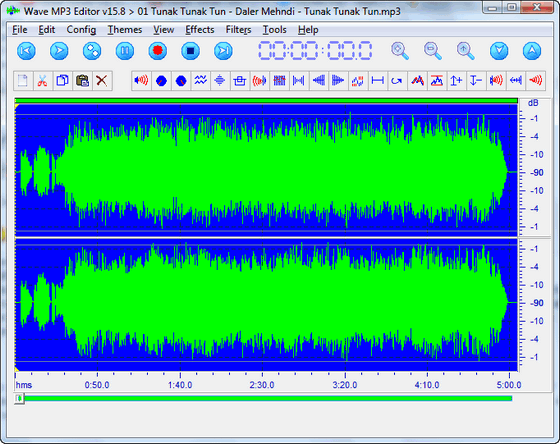
Thread's original title: "recommend audio editor to cut out middle part and still keep pitch" -but the proper word is not "pitch", and I already have the right editor!  ---------------------------- I have grown fond of my audio file version of the silly Tunak Tunak Tun by Daler Mehndi. But without the video my ears are telling me that the song is too long - it must be shortened! But I don't want to just cut off the end, but the middle part of the song. This has turned out to be a much bigger problem than expected. So far it has been impossible for me to get it perfect; the cut is never right on pitch. The operation is even more difficult because the song is so "turn up every volume button"-loud recorded:  Have you tried to cut off the middle part of a song? Can you recommend a good audio editor to do so? Of course I expect Adobe, Sony and other expensive editors can make such an operation easy, but Real Life is not that easy, so I want you to recommend a really cheap solution. ;-) The free Direct Cut cannot do it - at least not when I am using it. 64-bit Windows 7
|
|
|
|
« Last Edit: July 07, 2012, 04:06:57 PM by Curt »
|
Logged
|
Remember what you said, because in a day or two, I'll have a witty and blistering retort! You'll be devastated THEN!
|
|
|
|
eleman
|
 |
« Reply #1 on: July 05, 2012, 08:10:25 AM » |
|
|
|
|
|
|
Logged
|
|
|
|
|
Curt
|
 |
« Reply #2 on: July 05, 2012, 08:16:57 AM » |
|
-yes, but Audacity and MP3 Direct Cut are no different from my Wave MP3 Editor, unless they have a relevant feature that I not yet have understood how to use.
|
|
|
|
|
Logged
|
Remember what you said, because in a day or two, I'll have a witty and blistering retort! You'll be devastated THEN!
|
|
|
|
|
justice
|
 |
« Reply #3 on: July 05, 2012, 08:33:00 AM » |
|
Any audio editor can do it, the key is to set a start and end marker (or loop points). Then do a continious playback, zoom in and move the markers slightly left or right until it sounds right. Now you can select and cut out the loop and the rest of the song will sound fine.
Always position the marker on a point exactly on the x axis (centre of the waveform) to avoid clicks appearing due to breaks in the waveform.
|
|
|
|
|
Logged
|
|
|
|
|
Curt
|
 |
« Reply #4 on: July 05, 2012, 09:37:48 AM » |
|
-so I need to put on my glasses and read the ####ing manual?!  Thanks, justice. I understand that I have not shown enough patience with my editor. I will take another try when I have better time than today. Or maybe I will rather wait another 3 weeks for Ashampoo Music Studio 4 to be launched, it "must" be tested anyway: Ashampoo Music Studio 4 covers the whole bandwidth from music creation to production.
Shhh... Upgrade version: Buy now for only $11.99 - only for owners of a previous version
Create Rip audio CDs Record from audio sources: Microphone, line in and any other Windows recording device Video-2-Music: Extract audio from video files, e.g. to create ringtones
Edit Edit file tags Rename and move files based on ID-Tags Convert between multiple formats: MP3, WMA, OGG, WAV, FLAC Cut, mix and modify audio data within audio files Normalize file volumes
Design Covers, labels and booklets
Produce Track Mixer: Create new songs out of existing audio files Burn Audio CDs, input formats: MP3, WMA, OGG, WAV, FLAC Burn MP3, WMA and mixed audio data discs Print designs
..and many more
|
|
|
|
|
Logged
|
Remember what you said, because in a day or two, I'll have a witty and blistering retort! You'll be devastated THEN!
|
|
|
|
daddydave
|
 |
« Reply #5 on: July 07, 2012, 07:30:19 AM » |
|
I don Seconded. I don't think it's going to get any easier than Audacity. Just select the middle part, hit Delete, then go to File > Export. Or have I misunderstood what you want?
|
|
|
|
|
Logged
|
|
|
|
|
eleman
|
 |
« Reply #6 on: July 07, 2012, 07:45:02 AM » |
|
Or have I misunderstood what you want?
He has some trouble with the pitch. I don't know what pitch is (standard issue ears here, they may even be defective), but I guess trying to tell me what it is would be like trying to describe the difference between green and red to a color blind.
|
|
|
|
|
Logged
|
|
|
|
|
Curt
|
 |
« Reply #7 on: July 07, 2012, 09:15:21 AM » |
|
pitch is the wrong word, I realize. Keep pace, I should have said.
|
|
|
|
|
Logged
|
Remember what you said, because in a day or two, I'll have a witty and blistering retort! You'll be devastated THEN!
|
|
|
|
daddydave
|
 |
« Reply #8 on: July 07, 2012, 10:29:45 AM » |
|
Is pace the same as tempo?
Do you mean to change the tempo of the second part to match the tempo of the first part, without changing the pitch?
|
|
|
|
|
Logged
|
|
|
|
|
Dormouse
|
 |
« Reply #9 on: July 07, 2012, 12:28:28 PM » |
|
my ears are telling me that the song is too long - it must be shortened! ...So far it has been impossible for me to get it perfect; the cut is never right on pitch.[/i]
Most audio editors will do it - but to do it perfectly your ears must recognise the precise start and end points of the section you want to remove. And you need enough zoom control to be able to see those moments on the screen. Will also only work if those perfect moments exist; this frequently is not the case when there are a number of instruments & voices going as all of them are unlikely to flow on without apparent interruption at any snipping point. PS Wave MP3 Editor should certainly be able to do it, if it can be done to your liking at all.
|
|
|
|
|
Logged
|
|
|
|
|
Curt
|
 |
« Reply #10 on: July 07, 2012, 03:54:20 PM » |
|
Thanks for the many helping answers. I ask you all to forgive that my school-English doesn't master this kind of explanations. Pitch was not the accurate word, but I think "keeping pace" is. A long and hard explanation: If the first ("left") cut was made in the first chorus, in the middle of the word "sunshine", then the second ("right") cut must make the second half of third chorus' "sunshine" fulfill the first "sun...", in the merged clips, so he again is singing sunshine.
Confused? You won't be after next episode of SOAP!
--------------- I won't actually start doing it until next week.
|
|
|
|
« Last Edit: July 07, 2012, 04:04:56 PM by Curt; Reason: title »
|
Logged
|
Remember what you said, because in a day or two, I'll have a witty and blistering retort! You'll be devastated THEN!
|
|
|
|
40hz
|
 |
« Reply #11 on: July 07, 2012, 06:50:21 PM » |
|
If you can't get a clean cut point you could always try splitting the track into two before and after the word sunshine, then overlap the two tracks on the word sunshine, and then see if you can do a smooth crossfade between the two tracks. It's not as precise as a cut and splice. But it's what many producers do when they need to chop something out of a song. Done right (source material permitting) a crossfade can mask a splice point very effectively. YMMV. Luck!  Addendum: For a list of 25 free audio mixing apps look here. I've personally used Audacity, Ardour, Jokosher, and Wavosaur. Of the bunch I liked Ardour and Wavosaur the most. But the other two were also very good programs. Why not try a half dozen and see which one you like best?
|
|
|
|
« Last Edit: July 07, 2012, 07:01:14 PM by 40hz »
|
Logged
|
|
|
|
|
Curt
|
 |
« Reply #12 on: July 08, 2012, 07:49:39 AM » |
|
-wow; I've never even heard of Ardour or Jokosher. Will go and test! (Linux / Mac, not Win) Thanks also for the directions on cross-fading.
|
|
|
|
« Last Edit: July 08, 2012, 08:00:14 AM by Curt »
|
Logged
|
Remember what you said, because in a day or two, I'll have a witty and blistering retort! You'll be devastated THEN!
|
|
|
|
40hz
|
 |
« Reply #13 on: July 08, 2012, 09:05:22 AM » |
|
Last I checked there was a live Linux distro called ArtistX that had Jokosher on it. IIRC, Dynebolic (another live distro) has Ardour on it. They're huge downloads since they both have a ton of media tools on them. So we're talking 1-2Gb DVD isos. But if you're somewhere with a really fast connection (i.e. university/school) they might be worth checking out. 
|
|
|
|
|
Logged
|
|
|
|
|
daddydave
|
 |
« Reply #14 on: July 08, 2012, 09:49:19 AM » |
|
-wow; I've never even heard of Ardour or Jokosher. Will go and test! (Linux / Mac, not Win) Thanks also for the directions on cross-fading. Jokosher does seem to have a Windows version, in case you missed it.
|
|
|
|
|
Logged
|
|
|
|
|
TaoPhoenix
|
 |
« Reply #15 on: July 08, 2012, 10:20:35 AM » |
|
I've chopped some stuff with Audacity before. I recommend that you don't try to chop any of the actual words - cut a little earlier in one of the instrumental parts. I agree when the full song mixing is going on it's hard to chop, so when I do this stuff I look for one of those quieter set-up spots after one of the bridges or such before it loops back to the verse.
It's hard to get it truly perfect, but I find I do okay if I get close enough that it's only a microsecond blip and then I forget about it.
|
|
|
|
|
Logged
|
|
|
|
|
Curt
|
 |
« Reply #16 on: July 08, 2012, 02:14:07 PM » |
|
-yes, TaoPhoenix, and Thanks for reminding. A moment of silence would of course be the best place to cut, but the track is full volume from beginning to end, so I turned on some Sunshine because it made it all easier to explain.
|
|
|
|
|
Logged
|
Remember what you said, because in a day or two, I'll have a witty and blistering retort! You'll be devastated THEN!
|
|
|
|