|
TaoPhoenix
|
 |
« on: April 24, 2012, 05:28:19 PM » |
|
I'm on XP and lately I'm downloading a lot of zipped stuff. The slightly clunky design of the WinXP extractor is finally irritating me! It's between 5 and 6 clicks to unzip a file via the wizard.
What about a "Turbo-Unzipper"?
Something like click to select the file, then either a hotkey unzips it, "yes I want it here, no, I don't want to open the resulting folder." Then at the very end it does something like the Files2Folder trick and jams the Zip inside the newly created folder.
|
|
|
|
|
Logged
|
|
|
|
|
Renegade
|
 |
« Reply #1 on: April 24, 2012, 05:33:02 PM » |
|
I came up with this functionality for ALZip v7 or v6.x a long time ago. You can check to see if they still have it in there. Basically, you could select how to treat files, so you could double-click a ZIP file to unzip it to a folder, or open ALZip or display the context menu. It was the fastest way to unzip files you could possibly imagine. http://www.altools.com/However, things may have changed since then. Not sure if there's a copy of the v6.x or v7 hanging around out there somewhere that you could use.
|
|
|
|
|
Logged
|
|
|
|
|
TaoPhoenix
|
 |
« Reply #2 on: April 24, 2012, 06:10:46 PM » |
|
"You" came up with this - but Cnet claims it's $29.95 to buy! It's 5 clicks man, not $29.95 worth!
Or is that something evil that CNet stuck on there?
|
|
|
|
|
Logged
|
|
|
|
|
|
Renegade
|
 |
« Reply #3 on: April 24, 2012, 06:40:56 PM » |
|
"You" came up with this - but Cnet claims it's $29.95 to buy! It's 5 clicks man, not $29.95 worth!
Or is that something evil that CNet stuck on there?
Well, I came up with the design and functional specs, but Jaehoon did all the coding. ALZip 6.7 was the last freeware version I think. They changed the licensing model after I left the company. Long story there... So, the current version is a 60-day shareware trial. I'm trying to find v6.7 for you now... I'll post back.
|
|
|
|
|
Logged
|
|
|
|
|
x16wda
|
 |
« Reply #4 on: April 24, 2012, 06:53:44 PM » |
|
Install 7-zip and set it in tools/options to associate with zip files. Then just right click your zip file and you can unzip it right there, unzip to a folder named like the file, etc.
Oh yeah, Haozip does the shell extension thing too (as do probably lots of other compression tools); one of the places I visit suggested trying it, and it seems to be as fast as 7-zip, but with a fancier looking interface. Of course if you just click-and-extract you don't ever see the interface...
|
|
|
|
« Last Edit: April 24, 2012, 06:56:51 PM by x16wda; Reason: added haozip note »
|
Logged
|
vi vi vi - editor of the beast
|
|
|
|
Renegade
|
 |
« Reply #5 on: April 24, 2012, 07:07:21 PM » |
|
Install 7-zip and set it in tools/options to associate with zip files. Then just right click your zip file and you can unzip it right there, unzip to a folder named like the file, etc.
Oh yeah, Haozip does the shell extension thing too (as do probably lots of other compression tools); one of the places I visit suggested trying it, and it seems to be as fast as 7-zip, but with a fancier looking interface. Of course if you just click-and-extract you don't ever see the interface...
Pretty much every other ZIP program has a context menu, but you still get stuck with a minimum of 2 clicks. Universal Extractor is very good as it lets you unzip setup files as well. There are a couple Japanese ZIP programs that let you extract in 1 click, but I forget the names of them.
|
|
|
|
|
Logged
|
|
|
|
|
|
|
TaoPhoenix
|
 |
« Reply #7 on: April 24, 2012, 07:19:04 PM » |
|
Thanks everyone at least for looking!
|
|
|
|
|
Logged
|
|
|
|
|
c.gingerich
|
 |
« Reply #8 on: April 24, 2012, 08:33:47 PM » |
|
I think i can make a dbl click to unzip if you are interested.
|
|
|
|
|
Logged
|
|
|
|
|
|
|
TaoPhoenix
|
 |
« Reply #10 on: April 24, 2012, 10:41:32 PM » |
|
Edit: Seems the first test file was an invalid archive, stand by.
|
|
|
|
|
Logged
|
|
|
|
|
TaoPhoenix
|
 |
« Reply #11 on: April 24, 2012, 11:49:19 PM » |
|
Okay, Better, "extract automatically" seems to have worked, so score 1 for Auto-Extract.
|
|
|
|
|
Logged
|
|
|
|
|
TaoPhoenix
|
 |
« Reply #12 on: April 25, 2012, 12:43:53 AM » |
|
Result: Extract-Now is close, unless Mr. Gingerich wants to write a brutal even faster one that runs on (double clicks or something.)
|
|
|
|
|
Logged
|
|
|
|
|
Ath
|
 |
« Reply #13 on: April 25, 2012, 01:46:22 AM » |
|
+1 for 7-Zip, and if you want to minimize clicks, turn off 'Cascaded context menu' in Options/7-Zip, so Extract Here and Extract to <folder> are directly available in the right-click context menu. Less than 2 clicks is useless imho, would you want all your zip-files to be extracted on double-click?
|
|
|
|
|
Logged
|
|
|
|
|
techidave
|
 |
« Reply #14 on: April 25, 2012, 04:25:43 AM » |
|
I too like TaoPhoenix have struggled with this very problem. Not sure why it has to be so difficult. Extract Now looks interesting, can it put the zip file in the extracted folder? I cannot tell from their screenshots.
|
|
|
|
|
Logged
|
|
|
|
|
Renegade
|
 |
« Reply #15 on: April 25, 2012, 04:49:19 AM » |
|
+1 for 7-Zip, and if you want to minimize clicks, turn off 'Cascaded context menu' in Options/7-Zip, so Extract Here and Extract to <folder> are directly available in the right-click context menu. Less than 2 clicks is useless imho, would you want all your zip-files to be extracted on double-click?
Personally, I like getting the ZIP context menu on a double-click. It's insanely fast compared to opening a full program, and you have every available option right there. But if you have 1-click extraction for a double-click, you always still have the right-click menu available. So, you really don't lose anything. You simply have to figure out what you want to do. It's really all just a matter of how you like your work-flow. Some people are simply slow, and slower methods are good enough for them.
|
|
|
|
|
Logged
|
|
|
|
|
c.gingerich
|
 |
« Reply #16 on: April 25, 2012, 07:47:21 AM » |
|
Ok, well I think I'm going to try my had at making the app. 
|
|
|
|
|
Logged
|
|
|
|
|
Renegade
|
 |
« Reply #17 on: April 25, 2012, 08:20:08 AM » |
|
Ok, well I think I'm going to try my had at making the app.  If you take advantage of one of the available command line utilities, I'm sure you can save a TRUCKLOAD of time. (Believe me... anyone can make a zip utility, but it takes SKILL to make a good one.)
|
|
|
|
|
Logged
|
|
|
|
|
c.gingerich
|
 |
« Reply #18 on: April 25, 2012, 09:50:00 AM » |
|
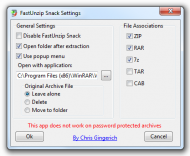
Here is the app. FastUnzip Snack. There is no settings dialog or anything. Just install and it will associate to ZIP files (may add more by request). Then just double click on a ZIP file and it will extract to the current folder as a sub-folder of the ZIP file name. So if you have a Zip file called MyZip.zip, it will extract to a folder called MyZip. Once extracted, the folder is opened. For now that is all it does, but I may add other features. Maybe adding a settings box that gives an option to show a popup menu when double clicking a ZIP to Extract Here or Extract to sub-folder. Any other ideas? [EDIT]Updated to add comments from TaoPhoenixThis turned out to be a really sweet app IMO. After install you will get a settings dialog (see attached image) that will allow you to: - Set the file associations (supported file types are ZIP, RAR, 7z, TAR, CAB)
- Set an Open With application to open archives (used when FastUnzip Snack is disabled or popup menu is used)
- Disable FastUnzip Snack (must have an Open With application set)
- Use a popup menu before extraction (see attached image)
You can also open the settings from Start > FastUnzip Snack > FastUnzip Snack Settings Update 4/26/12 - Added a refresh after extraction
Update 4/25/12: - Added sub menus in popup menu to allow delete and move w/o having to set in the settings dialog
 
|
|
|
« Last Edit: April 26, 2012, 07:22:04 AM by c.gingerich »
|
Logged
|
|
|
|
|
Renegade
|
 |
« Reply #19 on: April 25, 2012, 10:09:40 AM » |
|
Here is the app. FastUnzip Snack. There is no settings dialog or anything. Just install and it will associate to ZIP files (may add more by request). Then just double click on a ZIP file and it will extract to the current folder as a sub-folder of the ZIP file name. So if you have a Zip file called MyZip.zip, it will extract to a folder called MyZip. Once extracted, the folder is opened.
For now that is all it does, but I may add other features. Maybe adding a settings box that gives an option to show a popup menu when double clicking a ZIP to Extract Here or Extract to sub-folder.
Any other ideas?
Wow. That was fast. Can I ask what you used?
|
|
|
|
|
Logged
|
|
|
|
|
c.gingerich
|
 |
« Reply #20 on: April 25, 2012, 10:22:41 AM » |
|
As far as the programming language? I use Visual Dialogscript and I already had made something similar to what you were asking for personal use. It extracted a ZIP file to a temp dir then displayed all the executable files and allowed me to choose one to run. I just took that code and changed it up a bit to make this.
|
|
|
|
|
Logged
|
|
|
|
|
TaoPhoenix
|
 |
« Reply #21 on: April 25, 2012, 10:32:31 AM » |
|
Here is the app. FastUnzip Snack. There is no settings dialog or anything. Just install and it will associate to ZIP files (may add more by request). Then just double click on a ZIP file and it will extract to the current folder as a sub-folder of the ZIP file name. So if you have a Zip file called MyZip.zip, it will extract to a folder called MyZip. Once extracted, the folder is opened.
For now that is all it does, but I may add other features. Maybe adding a settings box that gives an option to show a popup menu when double clicking a ZIP to Extract Here or Extract to sub-folder.
Any other ideas?
That's promising too Chris! Please add about three more features: 1. Option on/off whether the new created folder opens. A lot of times I am just managing programs, and I don't actually want to look at it/run it. 2. Add support for Rar files. Seems like a lot of those Ludum games are Rars. 3. Add an option what to do with the original Zip. A. move it inside the created unzip folder, or B. Trash it. These should be in settings, not individual dialogs. Then once the user gets his patterns down, he can just cruise. Thanks for jumping into Snack Land! --Tao
|
|
|
|
|
Logged
|
|
|
|
|
c.gingerich
|
 |
« Reply #22 on: April 25, 2012, 10:34:29 AM » |
|
Ok. I think I can add these. At work now, but I'll get to this as soon as I can. 
|
|
|
|
|
Logged
|
|
|
|
|
jgpaiva
|
 |
« Reply #23 on: April 25, 2012, 11:20:01 AM » |
|
This topic here on DC is very relevant to this discussion  (actually, I think there are other similar ones).
|
|
|
|
|
Logged
|
|
|
|
|
TaoPhoenix
|
 |
« Reply #24 on: April 25, 2012, 11:57:19 AM » |
|
This topic here on DC is very relevant to this discussion  (actually, I think there are other similar ones). It is! However, I think I'll be happiest with the Snack in the works that Chris is working on. 
|
|
|
|
|
Logged
|
|
|
|
|