|
CleverCat
|
 |
« on: February 19, 2012, 02:51:44 AM » |
|
I'm planning to reinstall Win 7 - here's my plan: Current Setup: 7 year old Maxtor 160GB partitioned ATA Drive with Win 7 installed Brand New Seagate SATA 500GB partitioned and ready to go! (100GB for system - yes I know it's overkill but I've found Win 7 seem to take up more space than XP) rest for Data Here's my plan: (After 18 months of using Win 7 it's become messy and slow and I now realise I need to do things differently and I neglected to make an Acronis bare bones Image after install) I want to rebuild on new drive while continuing to be able to boot into current system until I've 'tweaked' new build to my satisfaction. As long as I wipe old system before the 30 day Activation is up, will I run into issues with licensing?  I plan to use old drive for Open Source OS. Any advice would be welcome! Thanks 
|
|
|
|
|
Logged
|
If you need help - JUST ASK!
|
|
|
|
mouser
|
 |
« Reply #1 on: February 19, 2012, 03:01:44 AM » |
|
I think it makes a ton of sense to have the old pc up and running for quite some time while you use the new machine, to make sure you didn't forget anything.
With the current pc prices I highly recommend having 2 pcs so you can do this kind of thing easily.
I can't think of any licensing trouble you would have.
|
|
|
|
|
Logged
|
|
|
|
|
CleverCat
|
 |
« Reply #2 on: February 19, 2012, 03:30:28 AM » |
|
I have one PC with 2 Hard Drives  Or is that what you meant?
|
|
|
|
|
Logged
|
If you need help - JUST ASK!
|
|
|
|
|
mouser
|
 |
« Reply #3 on: February 19, 2012, 03:35:15 AM » |
|
no i actually meant having a second pc.
|
|
|
|
|
Logged
|
|
|
|
|
CleverCat
|
 |
« Reply #4 on: February 19, 2012, 03:46:19 AM » |
|
Prices to high here - already cost me over R2000 - 2 months pension to upgrade MOBO and CPU. Laptops cost around R3000 for Netbook!! 
|
|
|
|
|
Logged
|
If you need help - JUST ASK!
|
|
|
|
CleverCat
|
 |
« Reply #5 on: February 19, 2012, 03:52:10 AM » |
|
Another complete PC would cost around R4000  The 'Bank Of Mother' doesn't stretch that far 
|
|
|
|
|
Logged
|
If you need help - JUST ASK!
|
|
|
|
mouser
|
 |
« Reply #6 on: February 19, 2012, 03:58:36 AM » |
|
I hear ya.. Though an old used computer would be fine for this task of secondary backup pc.
|
|
|
|
|
Logged
|
|
|
|
|
CleverCat
|
 |
« Reply #7 on: February 19, 2012, 04:00:55 AM » |
|
I would have put my old MOBO and CPU in new case, but they couldn't take Win7.....  At least all my Data is backed up on an external drive! Plus, I have an external enclosure drive....
|
|
|
|
« Last Edit: February 19, 2012, 04:06:01 AM by CleverCat »
|
Logged
|
If you need help - JUST ASK!
|
|
|
|
berry
|
 |
« Reply #8 on: February 19, 2012, 04:02:20 AM » |
|
You can "rearm" windows 7 to extend your 30 days up to 120 if you need additional time after 30 days.
cheers
|
|
|
|
|
Logged
|
|
|
|
|
4wd
|
 |
« Reply #9 on: February 19, 2012, 04:03:42 AM » |
|
I would recommend that you remove/unplug the Maxtor before installing Win7 on the Seagate, this will prevent the system from non-booting when you eventually use the Maxtor for something else. If you install Win7 to the Seagate while the Maxtor is plugged in, the installer will see the existing bootable HDD, (Maxtor), and add an entry to it's boot menu, When you remove the Maxtor, (or format it to install another OS), the bootable info, (MBR, etc), will be destroyed leaving you with a non-booting system. If you install Win7 with the Maxtor unplugged then the installer will create a new boot menu, (MBR or GPT), on the Seagate. If you then want to switch between systems you can use the BIOS Boot Menu key, (usually Escape, F12 or F11 - depends on motherboard), which is normally displayed next to the 'Press DEL to enter BIOS' message on the POST screen, this will allow you to choose which drive you want to boot off. Or you can add an entry to boot menu on the Seagate, (after plugging in the Maxtor), using EasyBCD, (free version link near the bottom).
|
|
|
|
« Last Edit: February 19, 2012, 05:51:28 AM by 4wd »
|
Logged
|
Four wheel drive: Helping you get stuck faster, harder, further from help...........and it's no different on this forum 
|
|
|
|
CleverCat
|
 |
« Reply #10 on: February 19, 2012, 04:35:13 AM » |
|
I have EasyBCD! Thought I might need for this... I'm unable to physically unplug Maxtor - how do I 'remove?' So I do this just during initial install? Gonna need to get my ducks in a row for this! 
|
|
|
|
|
Logged
|
If you need help - JUST ASK!
|
|
|
|
berry
|
 |
« Reply #11 on: February 19, 2012, 05:18:56 AM » |
|
Can you remove either the power or data cable connection?
|
|
|
|
|
Logged
|
|
|
|
|
CleverCat
|
 |
« Reply #12 on: February 19, 2012, 05:33:18 AM » |
|
Unfortunately not myself as I'm disabled and can't walk and Mum's skills don't stretch that far!  She's quite savvy with all the connections like USB etc so maybe she could...  If it's the only way, I'll have to plead with my local PC shop to send their guy who hooked up new one to disconnect then return to reconnect....  I have detailed MOBO manual with lots of pics so will see if Mum is willing!  Bear in mind she's just turned 84! 
|
|
|
|
|
Logged
|
If you need help - JUST ASK!
|
|
|
|
4wd
|
 |
« Reply #13 on: February 19, 2012, 05:42:52 AM » |
|
What's your motherboard make/model ?
It might be possible to disable the IDE interface via BIOS, (normally an option), which would hopefully render the Maxtor hidden from the Windows installer.
|
|
|
|
|
Logged
|
Four wheel drive: Helping you get stuck faster, harder, further from help...........and it's no different on this forum 
|
|
|
|
CleverCat
|
 |
« Reply #14 on: February 20, 2012, 05:10:50 AM » |
|
ECS Model G31T-M7 Will check manual - only just got here as we had no power all morning! 
|
|
|
|
« Last Edit: February 20, 2012, 05:22:31 AM by CleverCat »
|
Logged
|
If you need help - JUST ASK!
|
|
|
|
4wd
|
 |
« Reply #15 on: February 20, 2012, 06:03:05 AM » |
|
Hit the Delete key at the POST screen to get into the BIOS, (you may need to be rather quick depending on how fast your computer boots). Then you want: Integrated Peripherals->Onboard IDE Controller Setting it to Disabled should render the Maxtor hidden from Windows. F10 to Save the settings and exit. NOTE: Your machine will now be non-bootable until you either re-enable the IDE interface or install Win7 on the Seagate.So goes the theory, I have seen Windows identify drives even though the controller was supposedly 'disabled' in BIOS - it's why I prefer to unplug the drive. If you boot from the Win7 install disk and it only shows the Seagate drive to install to, then it should be OK. Once you have Win7 installed on the Seagate, you can go into the BIOS again and re-enable the IDE controller. Under the BIOS Advanced Setup->Hard Disk Drives you'll be able to set which drive you want to boot by default. WARNING: As with everything: make a backup, make sure it works, don't attempt this if you're not at all confident with playing around in the BIOS. The BIOS does have a 'Get out of Jail free' card if you do screw up. Hitting F9 will load the BIOS defaults which should return you to a system capable of booting off your Maxtor, (remember to hit F10 to save). Also note, if this is your only computer in the house then us friendly people can't render assistance if machine doesn't boot 
|
|
|
|
|
Logged
|
Four wheel drive: Helping you get stuck faster, harder, further from help...........and it's no different on this forum 
|
|
|
|
CleverCat
|
 |
« Reply #16 on: February 21, 2012, 01:59:22 AM » |
|
Thanks 4wd - will absorb info then decide  Mum says she's willing to delve into the case if necessary, but I've just got to make sure we unplug the right drive!  Thanks again - BTW I'm always fully backed up..... or did u mean the BIOS? 
|
|
|
|
|
Logged
|
If you need help - JUST ASK!
|
|
|
|
4wd
|
 |
« Reply #17 on: February 21, 2012, 04:06:08 AM » |
|
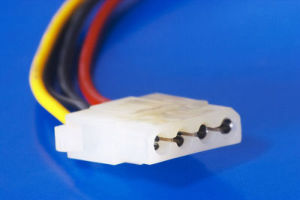
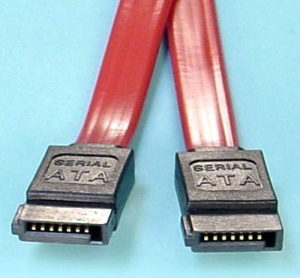
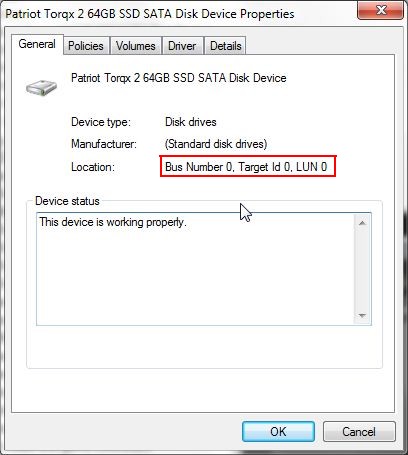
Mum says she's willing to delve into the case if necessary, but I've just got to make sure we unplug the right drive!  OK, now that's easy  ATA drive (Maxtor):  ATA data cable:  Molex power connector:  The molex power plug will be plugged into the point on the drive I've put a red star under. Unplug the power connector and the Maxtor is history, (figuratively speaking). They can be a tight fit, so you may need to wiggle it a little to get it to unplug. Make sure you have disconnected power to the computer, (turn off at power point or unplug power cable at the back). Watch you don't knock the crap out of something when the molex plug unplugs, (due to hand moving backwards on release). Plug the molex connector back in when you've finished installing to the Seagate, note the plug is polarised you can only plug it in one way - needless to say, make sure the power is off when you do it. The Seagate will have a data cable that looks like this, (well, it might not be red):  Is it possible to take the side off of your computer and take a picture with a camera? I just want to check the arrangement of the drives on the cables before you do anything, (PM it to me if you prefer). Also, if you could go into Device Manager, (Disk drives and DVD/CD-ROM drives), and get the Location information for each drive including optical. For example:  I need the info outlined in red to get an idea of how your drives are arranged on the cable(s).
|
|
|
|
« Last Edit: February 21, 2012, 08:11:06 PM by 4wd »
|
Logged
|
Four wheel drive: Helping you get stuck faster, harder, further from help...........and it's no different on this forum 
|
|
|
|
CleverCat
|
 |
« Reply #18 on: February 22, 2012, 12:44:11 AM » |
|
4wd - have sent PM 
|
|
|
|
|
Logged
|
If you need help - JUST ASK!
|
|
|
|
4wd
|
 |
« Reply #19 on: February 22, 2012, 02:10:41 AM » |
|
OK, might have a slight hiccup. Here's the info from Dev Manager: Maxtor - Location 0 (Channel 1, Target 0, Lun 0) Seagate - Location 0 (Channel 0, Target 0, Lun 0) Optical Writer - Location 1 (Channel 1, Target 1, Lun 0) The above might be indicating that the optical drive and the Maxtor are plugged into the same ATA/IDE port, (since you have only one, this is quite likely). The problem is that the Maxtor appears to be set as the Master device on the cable, with the optical as the Slave. Have to wait for the picture to be sure. It's been a while since I played with ATA/IDE devices, so anyone, (40, SJ), know if the Slave device will still work if the Master is removed? From what I've read it should still work, we can always go the 'suck it and see' route.
|
|
|
|
|
Logged
|
Four wheel drive: Helping you get stuck faster, harder, further from help...........and it's no different on this forum 
|
|
|
|
Stoic Joker
|
 |
« Reply #20 on: February 22, 2012, 06:49:27 AM » |
|
It's been a while since I played with ATA/IDE devices, so anyone, (40, SJ), know if the Slave device will still work if the Master is removed? Nope, somebody has to be in charge.  ...However the optical drive could be set to either cable select or master for the duration of the install if need be. That's realy a strange (bad) configuration, as IDE will only run at the speed of the slowest device, and optical drives aren't usually that fast. So it's got to be holding the IDE HDD back performance wise. If it's an 80 wire cable the plugs are color coded: Black = Master Gray = Slave Blue = MBoard
|
|
|
|
|
Logged
|
|
|
|
|
4wd
|
 |
« Reply #21 on: February 22, 2012, 08:00:19 AM » |
|
That's realy a strange (bad) configuration, as IDE will only run at the speed of the slowest device, and optical drives aren't usually that fast. So it's got to be holding the IDE HDD back performance wise. But having only one IDE port on the motherboard kind of limits things  I thought I read somewhere that they finally got around that slowest device problem, here we go from our friends at Wikipedia: Parallel ATASo really only a problem if accessing both devices on the same bus concurrently. I'm hoping that the optical drive is sitting on SATA Channel 1 and not IDE Channel 1 but with my luck..... Still a nice picture of the inside should clear things up a bit 
|
|
|
|
|
Logged
|
Four wheel drive: Helping you get stuck faster, harder, further from help...........and it's no different on this forum 
|
|
|
|
Stoic Joker
|
 |
« Reply #22 on: February 22, 2012, 11:40:32 AM » |
|
That's realy a strange (bad) configuration, as IDE will only run at the speed of the slowest device, and optical drives aren't usually that fast. So it's got to be holding the IDE HDD back performance wise. But having only one IDE port on the motherboard kind of limits things  True, I was thinking of the $20 SATA DVD burners I saw on NewEgg and musing aloud. I thought I read somewhere that they finally got around that slowest device problem, here we go from our friends at Wikipedia: Parallel ATASo really only a problem if accessing both devices on the same bus concurrently. I'll go with theory vs. practice on that one. It could be true...but I've never seen it happen. Come to think of it, I've never seen UATA-6 running at 133 either. *Shrug*  I'm hoping that the optical drive is sitting on SATA Channel 1 and not IDE Channel 1 but with my luck.....
Mine too ... But hay! ...Dare to dream! 
|
|
|
|
|
Logged
|
|
|
|
|
CleverCat
|
 |
« Reply #23 on: February 23, 2012, 02:20:47 AM » |
|
No more Road Blocks - Pleeeeeeze.........  I've been asking about the Slave/Master config for years but keep getting - "It's not a problem" - I don't agree....  Anyway - here are the pics Mum took (on the floor, in her nightie wearing a dust mask - there was a whole family of Dust Bunnies' living in the case which she cleared with canned air!) 
|
|
|
|
Logged
|
If you need help - JUST ASK!
|
|
|
|
CleverCat
|
 |
« Reply #24 on: February 23, 2012, 02:26:55 AM » |
|
The one optical connected at mo is an IDE! Its 8 years old. But the disconnected one is SATA.... 
|
|
|
|
|
Logged
|
If you need help - JUST ASK!
|
|
|
|