|
hulkbuster
|
 |
« on: February 09, 2012, 02:31:54 AM » |
|
Although i have been using Dopus for few weeks and although i am not a great fan of it or any other explorer for that matter but once in a while i realize its great to have them, so i install Dopus 10 and one thing i am really bothered is the way i want the folder of any drive to look the way i want i.e., File View in List and Sort by Types and i want this setup to be permanent in every folder i view and next time i logg in the PC or Restart the PC i want Dopus to remember that setup can i do that also the icon in the Tray icon is really bothering , i.e., when i want Dopus to exit the icon sits in the Tray icon, please see the picture.   Although i would like some suggestion as to which versions have been well durable and stable in all these releases of Dopus.
|
|
|
|
|
Logged
|
Norton AntiVirus / Autorun Virus Remover v.2.3 / Look n Stop Personal Firewall/ Some Common Sense
|
|
|
|
Curt
|
 |
« Reply #1 on: February 09, 2012, 02:49:40 AM » |
|
You only #think# you want it to exit, but actually you don't!... .  sorry! The reason is of course that DOpus takes up very little resources, when it sits in the tray. If closing it also was exiting it, you would complain that it was too slow launching. Anyway, it has "exit" two places; one in "File", and one in the tray icon's right-click menu. Consumption when closed to tray:  BTW: I am not a fan of DOpus, merely a user.
|
|
|
|
|
Logged
|
Remember what you said, because in a day or two, I'll have a witty and blistering retort! You'll be devastated THEN!
|
|
|
|
hulkbuster
|
 |
« Reply #2 on: February 09, 2012, 03:03:55 AM » |
|
I know that the icon sit in the tray but that's not the issue i want Dopus to exit once i close it from the Interface and once its closed i dont want the icon sitting in the Tray....i do know right clickin it and exiting it again is something i already know.
|
|
|
|
|
Logged
|
Norton AntiVirus / Autorun Virus Remover v.2.3 / Look n Stop Personal Firewall/ Some Common Sense
|
|
|
|
|
tomos
|
 |
« Reply #3 on: February 09, 2012, 03:38:03 AM » |
|
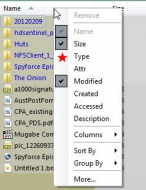
I'm no expert with changing folder layout format. I know it was very complicated in past versions, but I presume one of these options would work for you: right-click a column header ->Select "More" at the bottom of the list. Adjust your settings, click save; you then get these options  I presume the last option is what you want - but note that this might remove custom-default formats for e.g. music (maybe someone else could confirm that?) Dopus FAQ thread on the topic hereEDIT/ I'm not actually sure what exactly they mean by a "layout"...  EDIT2/ this FAQ guide might be better Folder Formats: Quick Guide
|
|
|
|
« Last Edit: February 09, 2012, 03:43:01 AM by tomos; Reason: added quick guide link »
|
Logged
|
|
|
|
|
4wd
|
 |
« Reply #4 on: February 09, 2012, 04:06:35 AM » |
|
also the icon in the Tray icon is really bothering , i.e., when i want Dopus to exit the icon sits in the Tray icon, please see the picture. 
|
|
|
|
|
Logged
|
Four wheel drive: Helping you get stuck faster, harder, further from help...........and it's no different on this forum 
|
|
|
|
hulkbuster
|
 |
« Reply #5 on: February 09, 2012, 04:41:04 AM » |
|
I'm no expert with changing folder layout format. I know it was very complicated in past versions, but I presume one of these options would work for you: right-click a column header ->Select "More" at the bottom of the list. Adjust your settings, click save; you then get these options (see attachment in previous post)I presume the last option is what you want - but note that this might remove custom-default formats for e.g. music (maybe someone else could confirm that?) Dopus FAQ thread on the topic hereEDIT/ I'm not actually sure what exactly they mean by a "layout"...  EDIT2/ this FAQ guide might be better Folder Formats: Quick GuideI didn't understand that part can you please rephrase that , which column is that, i can't find that. right-click a column header ->Select "More" at the bottom of the list. Adjust your settings, click save; you then get these options Thank you ,
|
|
|
|
|
Logged
|
Norton AntiVirus / Autorun Virus Remover v.2.3 / Look n Stop Personal Firewall/ Some Common Sense
|
|
|
|
tomos
|
 |
« Reply #6 on: February 09, 2012, 05:03:37 AM » |
|
^ hmm... you're using "List" view arent you - there's no columns in that view, so my instructions are useless  Try the 2nd link in my post above - will show you another route to get there
|
|
|
|
|
Logged
|
|
|
|
|
hulkbuster
|
 |
« Reply #7 on: February 10, 2012, 09:11:08 PM » |
|
also the icon in the Tray icon is really bothering , i.e., when i want Dopus to exit the icon sits in the Tray icon, please see the picture. (see attachment in previous post)Thank 4wd, you are always their with every problem i come up with and you have all the suggestion their is available and something i can comprehend with, although i still can't get the folder view to be in View List and Sort it by Type: although same thing can be easily remembered by XYplorer and its simply light weight and versatile. Achieving the same thing here at Dopus will make it more versatile compared to its installer size and service running in the background. Hoggind the memory and achieving something meagre simply looks useless. I think i will end up with unistalling this Dopus. Why dont they make it versatile, hey Q-Dir does what i want it to do. Any suggestion or outlook on this. i.e, Dopus.
|
|
|
|
|
Logged
|
Norton AntiVirus / Autorun Virus Remover v.2.3 / Look n Stop Personal Firewall/ Some Common Sense
|
|
|
|
4wd
|
 |
« Reply #8 on: February 10, 2012, 11:53:46 PM » |
|
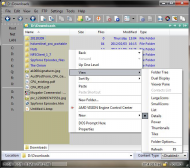
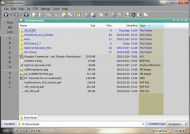
although i still can't get the folder view to be in View List and Sort it by Type: Do you mean you want any lister you open to be in List view sorted by Type? If that's the case, then: a) Switch folder view to Details, you can do this by right-clicking on a blank spot in the lister, (ie. not a file/folder entry, button, border, etc), and selecting View->Details NOTE: If you have Full Row select turned on then you need to right-click below the list of files/folders otherwise you'll just open the normal context menu.  b) Click on the Type column header to sort by Type The Type column is normally one of the default columns after DOpus has been installed, if you don't have it then right-click on the Name column header and checkmark Type in the menu that appears.  c) Switch folder view to back to List, right-click in a blank spot and select View->List  d) Set as Default Lister  Any lister you now open will be in List view sorted by Type unless there is a saved layout for that particular folder. NOTE: To be able to sort by a property, (Name, Size, Type, etc), in List view, the corresponding property column has to be visible in Details view. eg. Details view on left doesn't have Type column, ergo, List view on right doesn't have Sort By Type option.  PS. @tranglos: I am going to delete that mp3....honest! I'm just a bit lazy....there, it's finally gone (I didn't like it anyway - sorry) 
|
|
|
|
« Last Edit: February 11, 2012, 12:46:49 AM by 4wd »
|
Logged
|
Four wheel drive: Helping you get stuck faster, harder, further from help...........and it's no different on this forum 
|
|
|
|
hulkbuster
|
 |
« Reply #9 on: February 11, 2012, 08:27:56 AM » |
|
although i still can't get the folder view to be in View List and Sort it by Type: Do you mean you want any lister you open to be in List view sorted by Type? If that's the case, then: a) Switch folder view to Details, you can do this by right-clicking on a blank spot in the lister, (ie. not a file/folder entry, button, border, etc), and selecting View->Details NOTE: If you have Full Row select turned on then you need to right-click below the list of files/folders otherwise you'll just open the normal context menu. (see attachment in previous post)b) Click on the Type column header to sort by Type The Type column is normally one of the default columns after DOpus has been installed, if you don't have it then right-click on the Name column header and checkmark Type in the menu that appears. (see attachment in previous post) (see attachment in previous post)c) Switch folder view to back to List, right-click in a blank spot and select View->List (see attachment in previous post)d) Set as Default Lister (see attachment in previous post)Any lister you now open will be in List view sorted by Type unless there is a saved layout for that particular folder. NOTE: To be able to sort by a property, (Name, Size, Type, etc), in List view, the corresponding property column has to be visible in Details view. eg. Details view on left doesn't have Type column, ergo, List view on right doesn't have Sort By Type option. (see attachment in previous post)PS. @tranglos: I am going to delete that mp3....honest! I'm just a bit lazy....there, it's finally gone (I didn't like it anyway - sorry)  Thanks for this pointers with the pictures it is really helpful and that is what differentiate you with the other donation coders , with your selfless act and a willingness to help people, i feel i have a little bit of me in you in regards to . Thank you 4wd: and please be around.....
|
|
|
|
Logged
|
Norton AntiVirus / Autorun Virus Remover v.2.3 / Look n Stop Personal Firewall/ Some Common Sense
|
|
|
|
hulkbuster
|
 |
« Reply #10 on: September 14, 2012, 11:40:40 AM » |
|
|
|
|
|
|
Logged
|
Norton AntiVirus / Autorun Virus Remover v.2.3 / Look n Stop Personal Firewall/ Some Common Sense
|
|
|
|
hulkbuster
|
 |
« Reply #11 on: December 15, 2012, 11:13:59 AM » |
|
Hello folks, i have a little problem while using Dopus 10.2.0.0 (4645) , after fiddling around, maily the folder option, i got it how i wanted the to display the folder columns, that's all good. But every time i open Dopus the two panel windows show same drive i.e., C:\ please see the snapshot for what i mean.  So i want first panel to show C: and the other F: How do i do that. Any suggestion. This version of Dopus 10.2.0.0 (4645) looks and feel more stable and responsive, just giving it another go before i decide to uninstall it again.
|
|
|
|
|
Logged
|
Norton AntiVirus / Autorun Virus Remover v.2.3 / Look n Stop Personal Firewall/ Some Common Sense
|
|
|
|
mitzevo
|
 |
« Reply #12 on: December 15, 2012, 11:21:32 AM » |
|
Tip: When trying to edit out part of an image, don't use transparent fill if trying to hide/obscure something 
|
|
|
|
|
Logged
|
The early bird may get the worm; but the second mouse gets the cheese!
|
|
|
|
dr_andus
|
 |
« Reply #13 on: December 15, 2012, 12:04:47 PM » |
|
In case this is of help to anyone (and you don't want to descend into DOpus customisation hell  ), I've found Andy’s custom configuration and icons very helpful. All you need to do is download and install his template and icons and using DOpus suddenly gets a whole lot easier.
|
|
|
|
|
Logged
|
|
|
|
|
edbro
|
 |
« Reply #14 on: December 15, 2012, 12:20:23 PM » |
|
Hello folks, i have a little problem while using Dopus 10.2.0.0 (4645) , after fiddling around, maily the folder option, i got it how i wanted the to display the folder columns, that's all good. But every time i open Dopus the two panel windows show same drive i.e., C:\ please see the snapshot for what i mean. (see attachment in previous post)So i want first panel to show C: and the other F: How do i do that. Any suggestion. Change the other pane to what you want then save it as the default lister. Settings > Set as Default Lister
|
|
|
|
|
Logged
|
|
|
|
|
4wd
|
 |
« Reply #15 on: December 15, 2012, 07:34:52 PM » |
|
All you need to do is download and install his template and icons and using DOpus suddenly gets a whole lot easier. Only if you think the same way he does  eg. Pull down menus for almost everything which add an extra step not to mention that little arrow is a smaller target to hit than an icon.
|
|
|
|
|
Logged
|
Four wheel drive: Helping you get stuck faster, harder, further from help...........and it's no different on this forum 
|
|
|
|
hulkbuster
|
 |
« Reply #16 on: December 16, 2012, 04:45:42 AM » |
|
Change the other pane to what you want then save it as the default lister. Settings > Set as Default Lister
Thanks , i knew it was somewhere near, its really screws your head when you are multitasking in the heat of things, and that too with Dopus, which i feel is still the most complicated file explorer i have used. Thanks for the tip and i will paying more visits to Andy’s custom configuration and icons: what choice do i have here. Anyways happy holidays and Merry Chritmas in advance.
|
|
|
|
|
Logged
|
Norton AntiVirus / Autorun Virus Remover v.2.3 / Look n Stop Personal Firewall/ Some Common Sense
|
|
|
|