|
mouser
|
 |
« on: February 14, 2012, 02:51:25 AM » |
|
I have uploaded a Find and Run Robot beta:
NOTE: The beta is now an official release, download via the normal Find and Run Robot webpage.
I'd appreciate some feedback about whether it's launching everything properly for people? This is the first build using a manifest and signed executable, and some new code to disable windows redirection for x64 Operating systems, and so i'm a little nervous about things breaking. So I would appreciate some feedback about whether the new build refuses to launch any files/documents that the previous build had not trouble with. The beta *should* fix the problem where some windows 7 tools (Snipping tool for example) in the start menu were not launching. Thanks!
|
|
|
|
« Last Edit: February 14, 2012, 01:32:30 PM by mouser »
|
Logged
|
|
|
|
|
mouser
|
 |
« Reply #1 on: February 14, 2012, 02:53:44 AM » |
|
I'd particularly like to hear if MS Office links launch fine for people with x64 operating systems.
|
|
|
|
|
Logged
|
|
|
|
|
berry
|
 |
« Reply #2 on: February 14, 2012, 03:03:44 AM » |
|
Unable to extract the portable zip? Corrupted?
cheers
! O:\Downloads\FindAndRunRobotPortable.zip: The archive is corrupt ! O:\Downloads\FindAndRunRobotPortable.zip: The archive is corrupt
|
|
|
|
|
Logged
|
|
|
|
|
|
mouser
|
 |
« Reply #3 on: February 14, 2012, 03:35:19 AM » |
|
I've reuploaded now. Can you try redownloading and checking again
|
|
|
|
|
Logged
|
|
|
|
|
phitsc
|
 |
« Reply #4 on: February 14, 2012, 03:38:13 AM » |
|
FARR v2.104.01, Win 7 Pro x64
Launching apps works fine for me, including launching MS Office documents.
|
|
|
|
|
Logged
|
|
|
|
|
mouser
|
 |
« Reply #5 on: February 14, 2012, 03:51:54 AM » |
|
Thanks phitsc! 
|
|
|
|
|
Logged
|
|
|
|
|
IainB
|
 |
« Reply #6 on: February 14, 2012, 05:10:55 AM » |
|
Running FARR v2.104.01 under Win7-64 Home Premium Installed with no problems. Seems to load apps. with no problems, including MS Office 2007.
|
|
|
|
« Last Edit: February 14, 2012, 03:29:07 PM by IainB; Reason: Corrected incomplete version number (was v2.104.0). »
|
Logged
|
|
|
|
|
lanux128
|
 |
« Reply #7 on: February 14, 2012, 06:59:40 AM » |
|
tested on Win 7 Pro 64-bit and no launching problems.. yet.. 
|
|
|
|
|
Logged
|
|
|
|
|
skajfes
|
 |
« Reply #8 on: February 14, 2012, 08:00:51 AM » |
|
As farr as I can tell, everything works fine including launching office files and windows accessories (snipping tool, iis manager etc) 
|
|
|
|
|
Logged
|
It is impossible to make anything foolproof because fools are so ingenious.
|
|
|
|
cranioscopical
|
 |
« Reply #9 on: February 14, 2012, 09:30:05 AM » |
|
7-64 Pro MS office 2007 links are fine. Tried an assortment of other, commonly-used programs — all fine. Random selection of other stuff — all fine.
|
|
|
|
|
Logged
|
Chris
|
|
|
|
mouser
|
 |
« Reply #10 on: February 14, 2012, 01:29:14 PM » |
|
Thanks so much everyone for the feedback. I guess this is good enough for me to do a public release of this version. Next version I will do some more substantial feature additions. 
Beta download is now gone as it is now an official download 2.104.01 (no need to update if you already grabbed the beta).
|
|
|
|
|
Logged
|
|
|
|
|
mouser
|
 |
« Reply #11 on: February 14, 2012, 08:44:39 PM » |
|
Please redownload the new version 2.104.02 -- the version i uploaded was a debug build which will write run significantly slower than real release build that I just uploaded now.
|
|
|
|
|
Logged
|
|
|
|
|
witchfinder
|
 |
« Reply #12 on: February 15, 2012, 06:42:03 AM » |
|
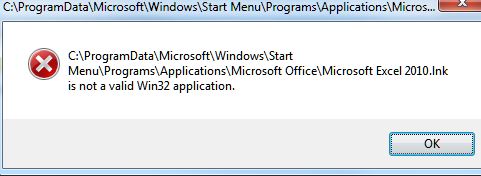
Just updated my FARR to the latest version (2.104.02) and having problems loading Office programs and documents. When I go to click on a search result in FARR, it gives me this error;  I tried Excel and Word and a number of documents for each program, and they all get the same error:( Any suggestions? I tried all the possible options in running programs and documents, none remedy the problem:( I'm using Win 7 64bit as my OS and Office 2010. - Update - I uninstalled 2.104.2 and went back to 2.102.3 and Office programs and documents ran fine through FARR once again so this has to be a bug in 2.104.2
|
|
|
|
« Last Edit: February 15, 2012, 08:02:21 AM by witchfinder »
|
Logged
|
|
|
|
|
mouser
|
 |
« Reply #13 on: February 15, 2012, 11:51:52 AM » |
|
I will put in an option to revert back to the previous behavior. But I wish I knew why it was causing you trouble. What the new version is doing now is turning off wow64redirection. Can you do this -- can you post a screenshot of your "Launching Files" option tab? (or email it to mouser@donationcoder.com).
|
|
|
|
|
Logged
|
|
|
|
|
mouser
|
 |
« Reply #14 on: February 15, 2012, 03:31:18 PM » |
|
I have uploaded a new silent update (ie no change in version #) which includes a new flag in the "Launching Files" options tab, to disable wow64redirection, which is checked by default and is the new behavior in 2.104 that may be causing you trouble. By unchecking that option you *should* go back to previous behavior. Let me know.
|
|
|
|
|
Logged
|
|
|
|
|