|
mouser
|
 |
« on: September 07, 2011, 10:39:00 PM » |
|
UPDATE 3/26/13:Regarding the instructions below -- while SC still works well with ShareX (and ShareXmod), it also now includes it's own built-in uploader which is considerably easier and faster to use.
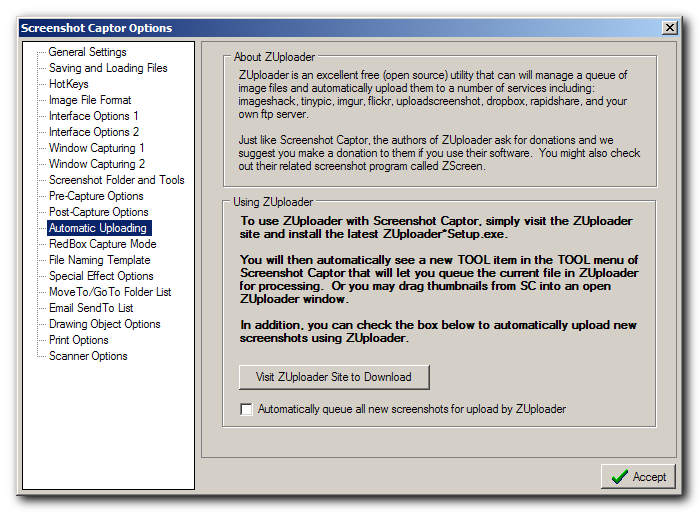
I wanted to start a new thread about the new support in Screenshot Captor for uploading and sharing screenshots using the free open source ZUploader 3rd party tool. From Screenshot Captor you will see help for installing ZUploader in the options - A checkbox to auto queue in zuploader after taking a screenshot
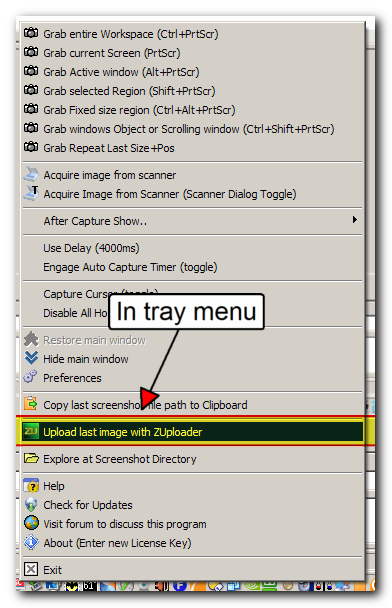
- A menu item in tray to upload last file
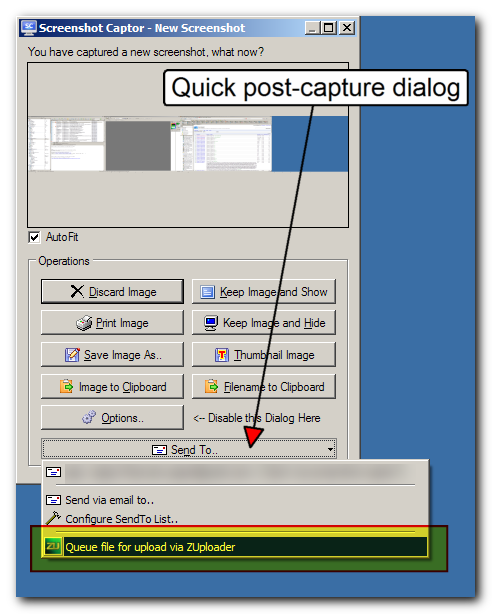
- A menu item in the SendTo menu of the post capture pop-up dialog
- A tool menu item in the main Tools menu.
In short, just install ZUploader and Screenshot Captor will know how to use it. Let me know how it works for you -- any questions or comments. And if you are a heavy user of this feature, please send a donation to the developers of ZUploader (see button in program window). In Options:  In main window Tools menu:  In System tray menu:  In optional quick post-capture dialog: 
|
|
|
|
« Last Edit: March 26, 2013, 08:10:26 AM by mouser »
|
Logged
|
|
|
|
|
Renegade
|
 |
« Reply #1 on: September 07, 2011, 10:44:20 PM » |
|
Thanks for posting that. It's out for me though. GPL. If anyone has a non-GPL suggestion, I'm all ears. I'm fine with LGPL, BSD, or pretty much anything else. Just not with viral licenses like the GPL. (Not that I'm against it -- it's just not for me.)
|
|
|
|
|
Logged
|
|
|
|
|
mouser
|
 |
« Reply #2 on: September 07, 2011, 10:52:34 PM » |
|
Well you might care about gpl if you were planning on incorporating the source code into your own application -- but this is a case where i am simply invoking the unchanged executable not making use of the source code.
Anyway -- let's keep this thread just for discussing the integration of ZUploader with Screenshot Captor.
|
|
|
|
|
Logged
|
|
|
|
|
|
mouser
|
 |
« Reply #3 on: September 08, 2011, 01:18:29 AM » |
|
ZUploader does a nice job -- it's never been easier to share a screenshot from Screenshot Captor: Two clicks and your SC image is uploaded to imageshack anonymously with a url copied to your clipboard that you can share with your friends.
Or configure one of the other private upload account options for more privacy.
Finally I think we have simple, fast and flexible image uploading functionality for SC.
Good job ZUploader!
|
|
|
|
« Last Edit: September 08, 2011, 01:23:22 AM by mouser »
|
Logged
|
|
|
|
|
mouser
|
 |
« Reply #4 on: September 08, 2011, 07:23:16 PM » |
|
Anyone tried it yet? I'm really loving ZUploader and I'm thrilled to finally have a good solution to all of SC's uploading/sharing needs.
I had a great talk with the lead developer of ZUploader who expressed a willingness to add features if people come up with any. I think one natural one might be allowing you to select multiple files at once from the thumbnail panel to upload in one operation (right now you have to select them one at a time if they weren't auto uploaded).
Any other feature requests? Any other feedback on the feature? Anyone having any trouble getting it to work?
|
|
|
|
|
Logged
|
|
|
|
|
cmpm
|
 |
« Reply #5 on: September 09, 2011, 08:05:21 AM » |
|
Thanks, I haven't played with it yet but I did set up the sites and email, which was easy. Will test and play when I have time.
This certainly a big plus for SC. Others will shoot and upload to sites but that's it, they don't have the excellent capture, edit and other abilities of SC.
|
|
|
|
|
Logged
|
|
|
|
|
Steven Avery
|
 |
« Reply #6 on: September 11, 2011, 12:33:08 AM » |
|
Hi,
Ok, I'm impressed. I know we were discussing zScreen and zUploader and it looks like screenshot captor simply gives you that much more versatility on the screen shot and manipulation and annotation area. kewl. So I now have a download (hmm.. have to figger out how to register) and will try some in the days ahead.
Interestingly, the Bits du Jour tonight (ends in an hour or so) has been CloudZap. CloudZap has similarity to zUploader in terms of upload integration.
However it works through setting up a queue by pointing to a file, or using their printer driver for a PDF OR through .. SnagIt for direct pic integration. The problem is that SnagIt is pricey, messing up the deal. The rest is still interesting, but that should go on a regular thread.
Shalom, Steven
|
|
|
|
|
Logged
|
|
|
|
|
mouser
|
 |
« Reply #7 on: September 20, 2011, 10:40:36 AM » |
|
I've posted a screencast video showing how ZUploader works with Screenshot Captor: 
|
|
|
|
|
Logged
|
|
|
|
|
Midnight Rambler
|
 |
« Reply #8 on: September 25, 2011, 12:05:37 PM » |
|
Great idea. Never realized that many of the screenshots I take do end-up on photobucket. Integration into SC saves a step.
|
|
|
|
|
Logged
|
Compaq Presario 5716 (98), Dell Dimension 4700 (XP), Lenovo ThinkPad R61i (Vista).
|
|
|
|
mtaki
|
 |
« Reply #9 on: September 25, 2011, 12:40:04 PM » |
|
With latest version of ZUploader it does not work.
The ZUploader windows pops up but no uploading starts
|
|
|
|
|
Logged
|
|
|
|
|
mouser
|
 |
« Reply #10 on: September 25, 2011, 12:43:21 PM » |
|
crikey you are right. is it the zuploader update that is making it fail or my screenshot captor update?
|
|
|
|
|
Logged
|
|
|
|
|
mouser
|
 |
« Reply #11 on: September 25, 2011, 12:48:29 PM » |
|
sigh.. it looks like somethng changed after ZUploader-4.0.0.2503-setup.exe -- that's the last version that it works with. install that version until i can talk to the author of ZUploader about why it's breaking.
---
Looks like the new version does not like spaces in filenames..
|
|
|
|
« Last Edit: September 25, 2011, 12:57:01 PM by mouser »
|
Logged
|
|
|
|
|
mouser
|
 |
« Reply #12 on: September 25, 2011, 01:22:11 PM » |
|
Thanks for the report -- I've pushed out a quick update to SC to make it pass short filename so it should work now with latest ZUploader; i'll go back to passing long filename when ZUploader author fixes ZUploader.
|
|
|
|
|
Logged
|
|
|
|
|
skwire
|
 |
« Reply #13 on: September 25, 2011, 06:47:34 PM » |
|
What about double-quoting the long filename before passing it to ZUploader?
|
|
|
|
|
Logged
|
|
|
|
|
Midnight Rambler
|
 |
« Reply #14 on: September 25, 2011, 07:48:47 PM » |
|
Yikes. Attempted to configure ZUploader to use my Photobucket account but don't like that it'll be trusted enough to view, delete or modify album files. Only want to allow uploads. 
|
|
|
|
|
Logged
|
Compaq Presario 5716 (98), Dell Dimension 4700 (XP), Lenovo ThinkPad R61i (Vista).
|
|
|
|
mouser
|
 |
« Reply #15 on: September 25, 2011, 08:06:55 PM » |
|
Let's ask Jaex, the developer, if it's possible to configure it with less permission.
|
|
|
|
|
Logged
|
|
|
|
|
|
|
mouser
|
 |
« Reply #17 on: September 25, 2011, 08:10:34 PM » |
|
Jaex! Welcome to the site and thank you so much for your work on ZUploader -- it's a great program. 
|
|
|
|
|
Logged
|
|
|
|
|
Midnight Rambler
|
 |
« Reply #18 on: September 25, 2011, 08:16:08 PM » |
|
Thanks for checking. Unfortunately, ZUploader's permission needs are a fatal drawback. Call me paranoid, but don't want to risk anybody messing with my files.
|
|
|
|
|
Logged
|
Compaq Presario 5716 (98), Dell Dimension 4700 (XP), Lenovo ThinkPad R61i (Vista).
|
|
|
|
mouser
|
 |
« Reply #19 on: September 25, 2011, 09:06:33 PM » |
|
Just means you can't use photobucket -- or that you should complain to photobucket to make available a lesser permission option.
|
|
|
|
|
Logged
|
|
|
|
|
mouser
|
 |
« Reply #20 on: September 25, 2011, 09:59:16 PM » |
|
What about double-quoting the long filename before passing it to ZUploader? Jaex fixed the problem -- it will be fixed in his next update of ZUploader 
|
|
|
|
|
Logged
|
|
|
|
|
Midnight Rambler
|
 |
« Reply #21 on: September 26, 2011, 10:19:44 AM » |
|
An alternative would be to use TinyPic where an account isn't required.
|
|
|
|
|
Logged
|
Compaq Presario 5716 (98), Dell Dimension 4700 (XP), Lenovo ThinkPad R61i (Vista).
|
|
|
|
oversky
|
 |
« Reply #22 on: February 23, 2012, 12:38:47 AM » |
|
I install both Screenshot Captor and ZUploader in portable mode. How do I config Screenshot Captor to use ZUploader? I search all .ini files and can't find anything relative to it. It seems that Screenshot Captor is search for registry data for ZUploader path.
|
|
|
|
|
Logged
|
|
|
|
|
mouser
|
 |
« Reply #23 on: February 23, 2012, 12:43:13 AM » |
|
To run ZUpload with Screenshot Captor portably -- unpack the ZUploader.exe file and associated DLLs into the directory: C:\Program Files\Screenshot Captor\Tools\ZUploader
Let me know if it works for you.
|
|
|
|
|
Logged
|
|
|
|
|
oversky
|
 |
« Reply #24 on: February 23, 2012, 01:46:38 AM » |
|
Yes, this works. Get author support in 5 minutes. What more can I ask? Thank you.
|
|
|
|
|
Logged
|
|
|
|
|