AEN007
Participant
Posts: 74
Imagination is more important than knowledge
|
 |
« on: June 08, 2011, 11:59:04 AM » |
|
8June2011
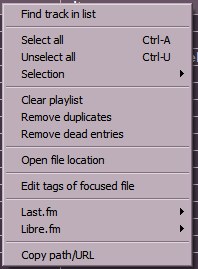
I have just noticed what seem to be some Trout playlist contextmenu (CM) bugs. After I hit the CM key and the playlist CM pop ups, Some of the &hotkeys in the CM do not seem to work.
For example, if I hit "s" for &Selection, nothing happens. Then if I "arrow down" to &Selection, I cannot then "arrow over" to expand to the &Selection subCM items... I have to use/move the mouse to use &Selection.
"c" for &Clear playlist does not seem to work ... "l" for &Last.fm does not seem to work ... "o" for C&opy path/URL does not seem to work ...
|
|
|
|
|
Logged
|
|
|
|
|
skwire
|
 |
« Reply #1 on: June 08, 2011, 12:02:00 PM » |
|
Works fine here on XP SP3. Anybody else having this issue?
|
|
|
|
|
Logged
|
|
|
|
AEN007
Participant
Posts: 74
Imagination is more important than knowledge
|
 |
« Reply #2 on: August 05, 2011, 10:29:44 AM » |
|
5August2011 Trout has these contextmenu problems on my XPsp3 PII and my XPsp3 P4. I suppose this problem might be similar to the problem of AHK scripts not being able to send Trout hotkeys to Trout because Trout is written in AHK. I have more than one Persistent AHK script running on my XP laptops ...
|
|
|
|
|
Logged
|
|
|
|
|
|
skwire
|
 |
« Reply #3 on: August 05, 2011, 10:33:21 AM » |
|
As I said before, I don't have these issues. I've tested on my main XP box, a Win 7 box and a Win 98 VM. This is with an English keyboard, though. Maybe that's part of your issue? I really have no idea.
|
|
|
|
|
Logged
|
|
|
|
AEN007
Participant
Posts: 74
Imagination is more important than knowledge
|
 |
« Reply #4 on: December 02, 2011, 07:06:12 AM » |
|
2December2011
Greetings.
I unloaded my persistent AHK scripts but still had/have these problems. I would like to solve them and wonder what might be the problem/solution ...
The Trout homepage still lists current version Build 40.
I've noticed a significant drop in CPU usage with the latest foobar2k release. Anyone else? Maybe the drop in CPU usage is only noticeable on old CPUs like my PII ...
|
|
|
|
|
Logged
|
|
|
|
|
app103
|
 |
« Reply #5 on: December 02, 2011, 07:43:49 AM » |
|
I am running XP sp3 on a Q6600 with classic themes, and I can confirm what AEN007 is saying. Just tested it and I am having a similar issue with the context menu hotkeys. There are no underline markers to show what the &hotkeys are, so I can't tell what to hit to jump through the menu.  Additionally, other hotkeys as shown on the menu, do not work with the menu open (Ctrl+A, Ctrl+U). Hitting those should close the menu and perform the desired action. That's not happening. Works fine if you close the menu and hit those hotkeys, though...just not while the menu is open. Navigating the menu with the arrow keys and selecting with the enter key does work fine for me, though.
|
|
|
|
|
Logged
|
|
|
|
|
skwire
|
 |
« Reply #6 on: December 02, 2011, 07:51:02 AM » |
|
I am running XP sp3 on a Q6600 with classic themes, and I can confirm what AEN007 is saying. Just tested it and I am having a similar issue with the context menu hotkeys. There are no underline markers to show what the &hotkeys are, so I can't tell what to hit to jump through the menu. They are there on my system so I will assume you have the "Hide underlined letters for keyboard navigation until I press the Alt key" option set on your computer as described here: http://www.ehow.com/how_7...ned-letters-keyboard.htmlAdditionally, other hotkeys as shown on the menu, do not work with the menu open (Ctrl+A, Ctrl+U). Hitting those should close the menu and perform the desired action. That's not happening. Works fine if you close the menu and hit those hotkeys, though...just not while the menu is open. Works here for me. I can right-click the list, display the menu, press Ctrl+A and it will highlight the entire list and the menu will disappear.
|
|
|
|
|
Logged
|
|
|
|
|
app103
|
 |
« Reply #7 on: December 02, 2011, 07:58:47 AM » |
|
Never knew about that setting, nor did I know I had it activated, as I always saw the underlines in other applications despite it being checked.  Everything works fine on the menu now, except the Ctrl+A, Ctrl+U issue. That still does not work with the menu open.
|
|
|
|
|
Logged
|
|
|
|
|
app103
|
 |
« Reply #8 on: December 02, 2011, 08:09:45 AM » |
|
By the way, according to that Windows setting, the underlines should show if I hit the Alt key. That doesn't happen. Hitting either Alt key closes the menu rather than displaying the underlines.
Also, with that setting activated, you do not see the underlines when right clicking to view the context menu, but you do see them if you hit the menu key on the keyboard. (weird)
|
|
|
|
|
Logged
|
|
|
|
|
skwire
|
 |
« Reply #9 on: December 02, 2011, 08:16:21 AM » |
|
By the way, according to that Windows setting, the underlines should show if I hit the Alt key. That doesn't happen. Hitting either Alt key closes the menu rather than displaying the underlines. Right, that setting was meant for when you press the Alt key to invoke the menu (not after you right-click). Also, with that setting activated, you do not see the underlines when right clicking to view the context menu, but you do see them if you hit the menu key on the keyboard. (weird) I have that setting unchecked and I see underlines regardless of how I invoke the menu (via right-click, the Apps key, or the Alt+E keystroke).
|
|
|
|
|
Logged
|
|
|
|
AEN007
Participant
Posts: 74
Imagination is more important than knowledge
|
 |
« Reply #10 on: December 08, 2011, 11:37:41 AM » |
|
8December2011 Greetings. The issue I am addressing is exactly as I have written and not app103's issue ... 8June2011
I have just noticed what seem to be some Trout playlist contextmenu (CM) bugs. After I hit the CM key and the playlist CM pop ups, Some of the &hotkeys in the CM do not seem to work.
For example, if I hit "s" for &Selection, nothing happens. Then if I "arrow down" to &Selection, I cannot then "arrow over" to expand to the &Selection subCM items... I have to use/move the mouse to use &Selection.
"c" for &Clear playlist does not seem to work ... "l" for &Last.fm does not seem to work ... "o" for C&opy path/URL does not seem to work ... 5August2011 Trout has these contextmenu problems on my XPsp3 PII and my XPsp3 P4. I suppose this problem might be similar to the problem of AHK scripts not being able to send Trout hotkeys to Trout because Trout is written in AHK. Any helpful/replies insights appreciated ...
|
|
|
|
|
Logged
|
|
|
|
AEN007
Participant
Posts: 74
Imagination is more important than knowledge
|
 |
« Reply #11 on: December 15, 2011, 06:39:47 AM » |
|
15December2011 Greetings.
I have determined the source of the problem! Trout has local hotkey "bug". The hotkeys should only "intercept" keystrokes when the main GUI is active - not when windows of any kind of the main GUI are "open".
There is also an enter key problem. Enter/Return starts playback even if not set as a local hotkey. If I do ALT-SPACE for the #32768 window/GUI menu with &Move/&Size/Max/Min ... (the &hotkeys do not work if I have a local hotkey set like "M" or "S") ... then choose Move or Size, then hit ENTER to finish the Move/Size, Trout will start playback ...
|
|
|
|
|
Logged
|
|
|
|
AEN007
Participant
Posts: 74
Imagination is more important than knowledge
|
 |
« Reply #12 on: January 16, 2012, 04:15:48 AM » |
|
16January2012 I am wondering if in the future there will ever be a Trout release without these local hotkey problems?
|
|
|
|
|
Logged
|
|
|
|
AEN007
Participant
Posts: 74
Imagination is more important than knowledge
|
 |
« Reply #13 on: May 08, 2012, 06:19:34 AM » |
|
8May2012 16January2012 I am wondering if in the future there will ever be a Trout release without these local hotkey problems?
No offense, I (otherwise) love Trout - but with these local hotkey bugs, Trout should not be / (never have been) award-winning ...
|
|
|
|
|
Logged
|
|
|
|
|