|
mouser
|
 |
« on: January 13, 2006, 07:51:01 PM » |
|
If you have programs where screenshot captor fails to successfully capture in autoscroll mode, post them here, maybe we can help add support for them.
autoscroll capture can be tricky sometimes so there are a number of exceptions that can be set in the options. an exception is of the form: WindowClassName;leftmargin;topmargin;rightmargin;bottommargin;extras
you can tell the WindowClassName because its shown in parentheses when you use redbox capture and select a window. the margins can be used to exclude scrollbars.
the extras supported so far (we will probably need to add more) are: blankstop sendkeys
[blankstop needs to be used on programs which overwrite our special marker because they do a custom draw in a weird way. ultraedit text editor window needs this. if during capture your window seems to keep trying to scrolling forever and never figures out when it hits the end, try this.
sendkeys is used for windows where the normal pageup and pagedown messages aren't handled. mozilla is an example of a program which needs this (but the exception is employed automatically in this case so you don't have to code an exception for this).]
and by all means if you figure out an exception setting for an app, post it for us to add.
|
|
|
|
|
Logged
|
|
|
|
|
jgpaiva
|
 |
« Reply #1 on: January 15, 2006, 07:09:56 PM » |
|
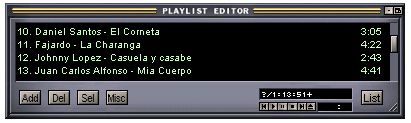
I've found 3 windows where sc's autoscrolling ability seems not to work. First is winamp's playlist window (although it works with all of the media library). Second and third are in msnmessenger's conversation and contacts window. I can't understand how to do an exception,could you explain a little better how to do it (maybe show an example,or something like that)?
|
|
|
|
|
Logged
|
|
|
|
|
mouser
|
 |
« Reply #2 on: January 16, 2006, 02:48:30 AM » |
|
i tried getting winamp to scrollcapture and couldn't, even in sendkeys mode which really *should* work...
the post above describes the idea. here's what might have worked with winamp but doesnt quite:
Winamp PE;20;20;20;50;sendkeys
that says when capturing windows of class "Winamp PE" it should use the margins of 20;20;20;50 (see above) and use the sendkeys method of scrolling.
im not sure why the sendkeys is not causing the window to scrol.. the margins are used to make the capture avoid the scrollbars and skinned window borders.
|
|
|
|
|
Logged
|
|
|
|
|
|
AbteriX
|
 |
« Reply #3 on: January 16, 2006, 04:12:13 AM » |
|
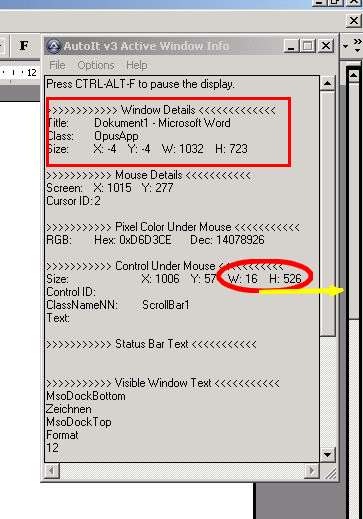
First there are WinAmp 2.x and 5.x (and even 3). What you talk about both ? Second, mouser, can you please explain where you take this numbers > WindowClassName;leftmargin;topmargin;rightmargin;bottommargin;extras > Winamp PE;20;20;20;50;sendkeys Maybe with this example window?  --------- FYI Au3 info.exe from AutoIt can show us this numbers in a nice way: 
|
|
|
|
|
Logged
|
Greetings, Stefan.
|
|
|
|
f0dder
|
 |
« Reply #4 on: January 16, 2006, 04:39:21 AM » |
|
Stefan, you should use GIF or (preferably) PNG image time when saving captures of user interfaces - JPEG is better for photos and stuff, but gives a smudged look for pictures like the above.
|
|
|
|
|
Logged
|
 - carpe noctem
|
|
|
|
jgpaiva
|
 |
« Reply #5 on: January 16, 2006, 04:46:17 AM » |
|
Hum.. I think now I've understood how exclusions work. @Stefan: thanks for the tip, using au3spy really helps on knowing where to cut! No problem about autoscrolling not working in winamp, it was more as an example than a really useful feature (what's the use of taking a screenshot of your playlist when you can export it?  ) But now I've some idea on how to use the exceptions! Thanks! 
|
|
|
|
|
Logged
|
|
|
|
|
AbteriX
|
 |
« Reply #6 on: January 16, 2006, 05:16:45 AM » |
|
> gives a smudged look They are compressed to 70% or lower
But your right of course :-) Pls remind me again if necessary :-)
@jgpaiva no prob ! HTH !
|
|
|
|
|
Logged
|
Greetings, Stefan.
|
|
|
|
Defenestration
|
 |
« Reply #7 on: January 17, 2006, 04:34:34 AM » |
|
Just tried SSC 2.09.10 beta to do scrolling capture of the file list of a Directory Opus lister window and, while it captured it successfully, the gap between some files is slightly too big. This appears to be at set intervals down the file listing so I assume the grab is done so many lines each time which are then appended together to give the complete listing. It's where they are appended together that the gap is slightly bigger. I can post a screengrab if you don't understand what I'm talkling about 
|
|
|
|
|
Logged
|
|
|
|
|
chris_j11
|
 |
« Reply #8 on: June 14, 2006, 05:31:07 PM » |
|
ms word 2000
also, is a way i can rotate the screenshot that i captured
|
|
|
|
« Last Edit: June 14, 2006, 05:41:51 PM by chris_j11 »
|
Logged
|
|
|
|
|
jdd
|
 |
« Reply #9 on: June 14, 2006, 07:53:59 PM » |
|
While we're on the subject of autoscroll capture, I have a silly question. If I save the file as .png or any other format, is there a good way to 'break' the image into multiple pages upon printing so I can actually read a long autoscroll capture?
|
|
|
|
|
Logged
|
|
|
|
|
jdd
|
 |
« Reply #10 on: June 15, 2006, 06:26:38 PM » |
|
I posted the question above but did not receive a reply so. Is there a trick to priniting a long autoscrolled file so it's legible?
|
|
|
|
|
Logged
|
|
|
|
|
mouser
|
 |
« Reply #11 on: June 15, 2006, 06:29:15 PM » |
|
 hmm.. this is a bit out of my expertise.. if you mean printing from screenshot captor itself, it should give you an option to scale the image to the page so it all fits. there may be better programs for printing images that will split an image over multiple pages (or printer drivers that do this).
|
|
|
|
|
Logged
|
|
|
|
|
jdd
|
 |
« Reply #12 on: June 15, 2006, 06:45:05 PM » |
|
You can scale and VIEW the image in SC, or save as an image and look at it in any image viewer. The problem is that when I print the file in SC or any other program, it prints as teeny tiny characters if the autoscroll is of any substantial length.
|
|
|
|
|
Logged
|
|
|
|
|
jgpaiva
|
 |
« Reply #13 on: June 15, 2006, 07:00:36 PM » |
|
@jdd: Most probably, a word processor might solve your problem. Did you try pasting the image on ms word or something? You could fit it to the width of a page, and it would spread along lots of pages. Though, you probably would have to change the borders of the page to as small as possible, to avoid possible loss of parts.
|
|
|
|
|
Logged
|
|
|
|
|
jdd
|
 |
« Reply #14 on: June 15, 2006, 07:08:40 PM » |
|
jgpaiva,
I tried that but it doesn't work. Any other suggestions?
|
|
|
|
|
Logged
|
|
|
|
|
chris_j11
|
 |
« Reply #15 on: June 16, 2006, 11:01:29 AM » |
|
so, am i the only i who tried to autocapture a ms 2000 document and cannot use the scrolling window capture functions or this program cannot scroll capture ms document
|
|
|
|
|
Logged
|
|
|
|
|
mouser
|
 |
« Reply #16 on: June 16, 2006, 11:05:08 AM » |
|
let me try a ms office document and see what i see.
yep - ms office apps are not capturing scrolled - let me see what i can do about it this weekend.
|
|
|
|
« Last Edit: June 16, 2006, 11:14:56 AM by mouser »
|
Logged
|
|
|
|
|
jdd
|
 |
« Reply #17 on: June 16, 2006, 11:28:13 AM » |
|
Point of clarification - My issue described above is not with capturing a screen. My issue/dilemma is how one prints out a hard copy of a lengthy autoscrolled screen capture so it can be viewed without a microscope.
|
|
|
|
|
Logged
|
|
|
|
|
chris_j11
|
 |
« Reply #18 on: June 16, 2006, 11:37:17 AM » |
|
let me try a ms office document and see what i see.
yep - ms office apps are not capturing scrolled - let me see what i can do about it this weekend.
thanks you how about the ability to rotate after i screen capture?
|
|
|
|
|
Logged
|
|
|
|
|
mouser
|
 |
« Reply #19 on: July 02, 2006, 05:08:43 PM » |
|
chris_j11, you wrote: so, am i the only i who tried to autocapture a ms 2000 document and cannot use the scrolling window capture functions or this program cannot scroll capture ms document try the latest version (2.18.01), i have added substantial new brains to the scrolling window capture, and it seems to work for ms office capturing for me now, though it's still a bit rough (and only does vertical scrolling not horizontal!).
|
|
|
|
|
Logged
|
|
|
|
|
Defenestration
|
 |
« Reply #20 on: July 06, 2006, 11:52:30 PM » |
|
It's not possible to capture the status or chat windows from mIRC. It appears to scroll, but only the first page is captured.
Also, is it normal for it to appear to capture a window about 8 times for a single capture, or is that just the way it works ?
EDIT: The mIRC problem may be related to the fact that mIRC automatically copies text to the clipboard when it is highlighted.
|
|
|
|
« Last Edit: July 07, 2006, 12:14:59 AM by Defenestration »
|
Logged
|
|
|
|
|
mouser
|
 |
« Reply #21 on: July 06, 2006, 11:55:54 PM » |
|
scrolling cap of mirc window works great for me.. hmm... wonder why it wouldnt be working for you..
|
|
|
|
|
Logged
|
|
|
|
|
mouser
|
 |
« Reply #22 on: July 07, 2006, 12:23:26 AM » |
|
sc does not hightlight text so im not sure that would effect it.. maybe you could experiment a little more (and make sure you are using the latest beta of sc), and report any clues you discover? it really should work.
|
|
|
|
|
Logged
|
|
|
|
|
Defenestration
|
 |
« Reply #23 on: July 07, 2006, 12:32:21 AM » |
|
Hmmm... indeed.
I will investigate further and see if I can unearth anything untoward.
FYI, I am using SC 2.18.03
|
|
|
|
|
Logged
|
|
|
|
|
manthano
|
 |
« Reply #24 on: July 21, 2006, 01:13:01 PM » |
|
Scrolling window capture is only capturing the last frame of my window. I see it scrolling down to the bottom but it only captures the last frame. The top part of the window isn't captured. The class name of the window is "C/SIDE subform" The program is Microsoft Business Solutions - Navision v. 3.10. Is there a reason it would scroll but not capture the top part? Is there an exception i can set for that?
|
|
|
|
|
Logged
|
|
|
|
|