|
Coeluh
|
 |
« on: January 31, 2009, 11:37:34 AM » |
|
Hi there,
ive been using 2 screens for quite a long time. I have ultramon, which allows me to have a taskbar for the secondary monitor. Sometimes, i watch a movie fullscreen at the primary monitor. I still have a taskbar at the other one, but no clock. Couldn't there be a small 'always hover on top in the bottomright cornor' clock, with the same format of the style im using: royale. It shouldnt be that hard is it?
Gr Me
|
|
|
|
|
Logged
|
|
|
|
|
Coeluh
|
 |
« Reply #1 on: January 31, 2009, 12:27:27 PM » |
|
Like tictoctitle!
|
|
|
|
|
Logged
|
|
|
|
|
lanux128
|
 |
« Reply #2 on: February 02, 2009, 05:35:20 AM » |
|
you can use app's DClock2 and place it on the right corner of your 2nd taskbar. DClock 2 is a desktop clock that is small enough to fit over the titlebar of an open window and always stays on top. Perfect for people that keep their taskbar hidden (like me).
It has a number of customizing options and an assortment of time related tools. 
|
|
|
|
|
Logged
|
|
|
|
|
|
Coeluh
|
 |
« Reply #3 on: February 02, 2009, 02:04:25 PM » |
|
you can use app's DClock2 and place it on the right corner of your 2nd taskbar. DClock 2 is a desktop clock that is small enough to fit over the titlebar of an open window and always stays on top. Perfect for people that keep their taskbar hidden (like me).
It has a number of customizing options and an assortment of time related tools.  Wont stay on secondary screen at all.
|
|
|
|
|
Logged
|
|
|
|
|
app103
|
 |
« Reply #4 on: February 02, 2009, 04:28:15 PM » |
|
The latest version of DClock doesn't play too well with multi-monitor at this time. You could try the original, which does: http://appsapps.info/dclock1.phpIt's just a clock. (no extra features) 
|
|
|
|
« Last Edit: February 02, 2009, 04:34:15 PM by app103 »
|
Logged
|
|
|
|
|
lanux128
|
 |
« Reply #5 on: February 02, 2009, 08:01:25 PM » |
|
or you can use Skrommel's WinWarden to place apps anywhere on the screen..
|
|
|
|
|
Logged
|
|
|
|
|
Coeluh
|
 |
« Reply #6 on: February 08, 2009, 04:23:34 PM » |
|
I would like it to be in the same style as my taskbar clock.
|
|
|
|
|
Logged
|
|
|
|
|
Ath
|
 |
« Reply #7 on: February 16, 2009, 03:58:48 PM » |
|
I've been using Multi Monitor Taskbar (free)for several years on both XP and since over a year on Vista x64. It doesn't follow the XP/Vista theme at all, and the clock is fixed in US am/pm format, it can't be resized to double/triple height, and what not (see bottom-right of the page), but it does offer a nice second/third taskbar, display the time, an extended clipboard, and all the application buttons on the correct monitor(s), and can auto-hide, which is what I want/need it to do. Personally I wouldn't bother for the pro version, it seems like a simple slightly pimped version. Might be just good enough... /Ath
|
|
|
|
|
Logged
|
|
|
|
|
Target
|
 |
« Reply #8 on: February 16, 2009, 06:30:26 PM » |
|
I would like it to be in the same style as my taskbar clock.
what does this actually mean? Do you want the same functionality, or do you want it to look the same, or ???
|
|
|
|
|
Logged
|
"Look wise, say nothing, and grunt. Speech was given to conceal thought" - Sir William Osler
|
|
|
|
Coeluh
|
 |
« Reply #9 on: February 22, 2009, 04:58:33 AM » |
|
I want it to look the same.
|
|
|
|
|
Logged
|
|
|
|
|
Coeluh
|
 |
« Reply #10 on: February 28, 2009, 12:06:57 PM » |
|
Anyone?
|
|
|
|
|
Logged
|
|
|
|
|
app103
|
 |
« Reply #11 on: March 01, 2009, 02:36:32 AM » |
|
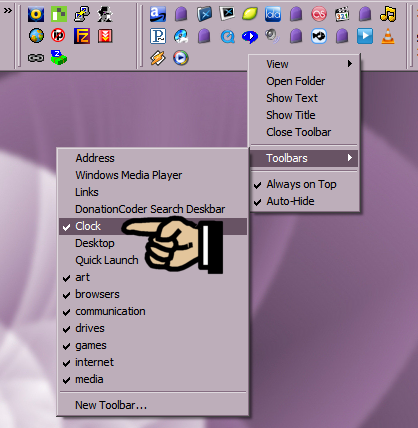
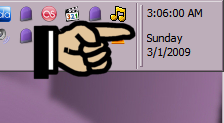
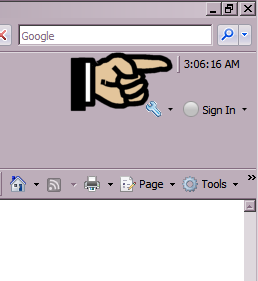
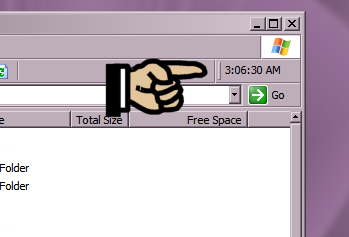
I hope this is what you meant: IE Clock:This is a deskbar/IE Toolbar that will display the current date & time on an extra toobar you have on your desktop, in IE (time only), and in Explorer windows (time only). After installing, right click your toolbar, Explorer bar, or IE bar, and select "Clock". If you don't see it listed, wait a few seconds and check the menu again.  This is what it looks like on a classic toolbar:  What it looks like in IE:  What it looks like in Explorer:  It does support themes, providing you don't use it on your main taskbar. The taskbar already has all of this information, so it would be a bit silly to use it there. I don't know how well it will work with specialty theming packages like Window Blinds, so if you test it with that, please let me know the results. IEClock.zip (431.6 KB - downloaded 325 times.)
|
|
|
|
|
Logged
|
|
|
|
|
mouser
|
 |
« Reply #12 on: March 01, 2009, 02:42:32 AM » |
|
great idea app!
|
|
|
|
|
Logged
|
|
|
|
|
Coeluh
|
 |
« Reply #13 on: March 03, 2009, 05:35:35 PM » |
|
I hope this is what you meant: IE Clock:This is a deskbar/IE Toolbar that will display the current date & time on an extra toobar you have on your desktop, in IE (time only), and in Explorer windows (time only). After installing, right click your toolbar, Explorer bar, or IE bar, and select "Clock". If you don't see it listed, wait a few seconds and check the menu again. (see attachment in previous post)This is what it looks like on a classic toolbar: (see attachment in previous post)What it looks like in IE: (see attachment in previous post)What it looks like in Explorer: (see attachment in previous post)It does support themes, providing you don't use it on your main taskbar. The taskbar already has all of this information, so it would be a bit silly to use it there. I don't know how well it will work with specialty theming packages like Window Blinds, so if you test it with that, please let me know the results. (see attachment in previous post)I am so sorry! I'll try to explain one more time what I mean! Check out my desktop here.Sometimes when I'm playing a game fullscreen on the left monitor (that's my primary) I do not have any clock around. I thought it would be nice to have some clock which was on the bottom right corner, or just something on desktop. I use ultramon to get that taskbar there, which is showing only stuff open on secondary window. I hope you did not put too much effort in. BTW: I made a donation, not much, cos I'm just a student and I can't afford 38 dollars.
|
|
|
|
|
Logged
|
|
|
|
|
app103
|
 |
« Reply #14 on: March 03, 2009, 07:05:25 PM » |
|
I keep my taskbar hidden, so I wouldn't normally have a clock onscreen at all, and I am a real clock nut. This is why I made the original DClock and I kept it located at the top of my screen. Since DClock2 can't work on a 2nd monitor, I would still recommend the original one that I mentioned before. It might not look the same as your taskbar clock, but you can locate it anywhere on the screen that you want...and it's small. I think the blue on white one would look nice with your particular desktop.  I hope you did not put too much effort in. BTW: I made a donation, not much, cos I'm just a student and I can't afford 38 dollars.
Don't worry about it. Most of the complicated stuff was code recycled from another project. And I am sure someone will find a use for it, even if you can't. And don't worry about how much you can afford to donate. The fact you donated at all makes you much more generous than most. Thank you.
|
|
|
|
|
Logged
|
|
|
|
|
Target
|
 |
« Reply #15 on: March 03, 2009, 07:37:14 PM » |
|
I don't have 2 monitors so I can't test this, but feel free to try this one
it's similar to app's DClock, but without any options to customise - if it works, I'll see what I can do...
|
|
|
|
Logged
|
"Look wise, say nothing, and grunt. Speech was given to conceal thought" - Sir William Osler
|
|
|
|
Coeluh
|
 |
« Reply #16 on: March 04, 2009, 10:02:45 AM » |
|
I don't have 2 monitors so I can't test this, but feel free to try this one
it's similar to app's DClock, but without any options to customise - if it works, I'll see what I can do...
Now it goes to the primary screen. If you could manipulate it to go to the other screen, I can help you with providing graphics?
|
|
|
|
|
Logged
|
|
|
|
|
Target
|
 |
« Reply #17 on: March 04, 2009, 04:42:03 PM » |
|
I wondered about that, I'll see if i can find a way around this
what about the format/appearance?
|
|
|
|
|
Logged
|
"Look wise, say nothing, and grunt. Speech was given to conceal thought" - Sir William Osler
|
|
|
|
Coeluh
|
 |
« Reply #18 on: March 05, 2009, 08:50:19 AM » |
|
I used RainMeter to display a fancy clock on my desktop. And some other stuff.  It's free and simple!
|
|
|
|
|
Logged
|
|
|
|
|
ares09x
|
 |
« Reply #19 on: March 11, 2009, 09:42:48 PM » |
|
Have you tried ClocX ( www.clocx.net)? I'm not sure it's flexible enough to make it look the way you want it to, but I have it on my second monitor on the upper left (I'm also using UltraMon) at 50% transparency and set to click-through mode so I can see a clock when I'm playing a game on my primary monitor. I like the click-through feature, because that way it can stay on top but not interfere with any menus, etc. on other windows underneath it. Regards, Bob Y.
|
|
|
|
|
Logged
|
|
|
|
|
Coeluh
|
 |
« Reply #20 on: July 28, 2009, 05:29:11 PM » |
|
Ok popping up again: I do not like rainmeter as it freaks out when I access my pc from my laptop. All I just need is a white text font size 10 font trebuchet, anti-aliasing enabled which floats always on top and remembers position on startup. Thats all. AHK is great.
|
|
|
|
|
Logged
|
|
|
|
|
lanux128
|
 |
« Reply #21 on: July 28, 2009, 08:57:00 PM » |
|
have you tried ZBar? this freeware adds a taskbar on the second monitor, with an optional clock. 
|
|
|
|
|
Logged
|
|
|
|
|
Coeluh
|
 |
« Reply #22 on: July 29, 2009, 05:31:07 AM » |
|
Yeah thats fine but it doesn't support my skin (Royale, media center). I emailed the creator though, asking him for it to implement
|
|
|
|
« Last Edit: July 29, 2009, 05:42:41 AM by Coeluh »
|
Logged
|
|
|
|
|
lanux128
|
 |
« Reply #23 on: July 29, 2009, 08:23:10 AM » |
|
Yeah thats fine but it doesn't support my skin (Royale, media center). I emailed the creator though, asking him for it to implement good move, the author is quite responsive too..
|
|
|
|
|
Logged
|
|
|
|
|
Coeluh
|
 |
« Reply #24 on: July 30, 2009, 07:09:47 AM » |
|
Yeah thats fine but it doesn't support my skin (Royale, media center). I emailed the creator though, asking him for it to implement good move, the author is quite responsive too.. Haven't had a reply yet, and also zbar is interfering with 3RVX OSD Volume
|
|
|
|
|
Logged
|
|
|
|
|