CHKDSK Assist is a GUI based script that allows you to schedule CHKDSK operations on your PC.
I welcome any questions or comments about it. Thanks!
OS Support: Windows XP, Windows Vista, Windows 7Tested On: Windows XP, Windows 7Download Links -> Installer OR
ZIP - Both link directly to my website for the download.
CHKDSKAssist_setup.exe is the version with an installer based on Inno Setup,
CHKDSKAssist.zip is a zip file with no installer.
You can also find this script on my website:
http://www.tylerretelle.comUpdates (Use Help->Check for Updates to upgrade)08/28/11: v1.6.2 has been released. Release notes below.
-Fixed an issue with the About dialog.
-Engine upgraded to AutoHotkey_L v1.1.03.00.
-Added a status bar to the Options GUI. (GUI RV18)
-Moved Options GUI status messages to the status bar. (GUI RV18)
-Removed the Options GUI status message text boxes, which have been replaced by the status bar.
-Installer upgraded to TR Tools Setup v2.8.1.
-Made a minor behavior change to the Check for Updates code.
-Added compatibility fixes for newer AutoHotkey engine versions to the Check for Updates code.
-Includes v4 Revision 1.0.0 of the CHKDSK Assist Manual. The help file has been migrated from Helpinator v2.x FREE to v3.5 FREE.
Please Note: Upgrades from v1.4.1 or older are not supported due to the changes made to the installer. You must uninstall that version before installing the latest one.
Main GUI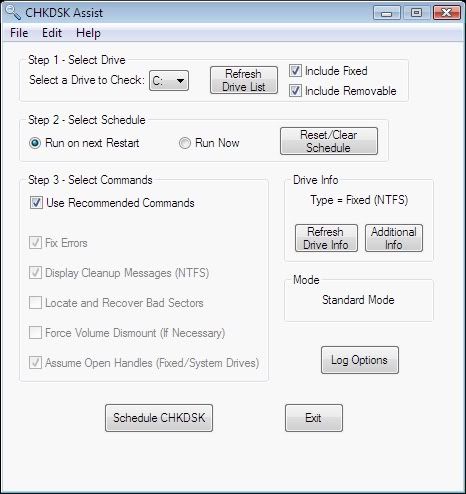
CHKDSK Assist - Schedule CHKDSK Operations
Options GUI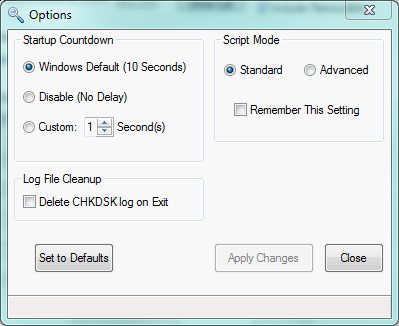
CHKDSK Assist - Schedule CHKDSK Operations


