| Application Name | File Replicator |
| Version | v1.2.1 |
| Short Description | See Description Below |
| Supported OSes | Windows XP, Windows Vista, Windows 7 |
| Web Page | tylerretelle.com |
| Download Links | Installer OR ZIP (Both link directly to my website for the download) |
| System Requirements | - Can run on pretty much any PC with the supported OSes above
|
| Version History | - See Readme included with download or the Updates section below
|
| Author | Tyler Retelle (darklight_tr) |
DescriptionFile Replicator is a program that searches for a specified file within a specified root folder and replaces it with another copy of the file. This is useful for updating a file that is located in multiple folders to a newer version. This is a GUI based replacement for the
File Propagator script.
Updates (Use Help->Check for Updates to upgrade)02/14/10: v1.2.1 has been released. Release notes below.
-Engine upgraded to AutoHotkey v1.0.48.05.
-Added Windows 7 to the supported and tested OS lists.
-Removed Windows Vista from the tested OS list because I no longer have any PCs running Windows Vista to test on. The OS will remain on the supported list.
-Includes v2 Revision 2.1.0 of the File Replicator Manual.
-Installer upgraded to Script Setup Utility v2.6.1.
-Made several changes to how version information is interpreted and displayed.
Please Note: Upgrades from v1.0.0 or older are not supported due to the changes made to the installer. You must uninstall that version before installing the latest one.
Planned Features- None at this time, but I am open to suggestions.
ScreenshotsMain GUI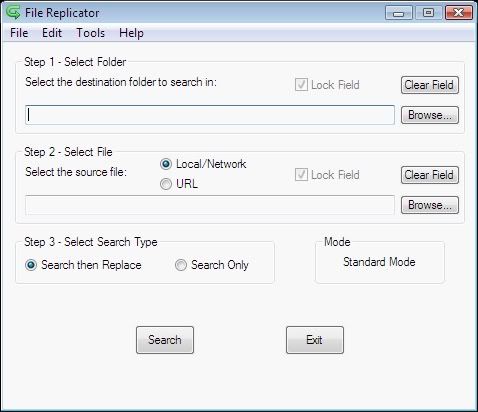
NANY 2009 Release: File Replicator
Options GUI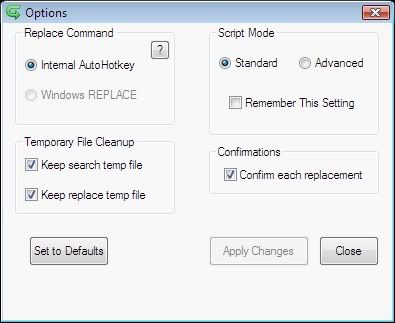
NANY 2009 Release: File Replicator
UsageInstallationI have attached two downloads to this post.
FileReplicator_setup.exe is the version with an installer based on Inno Setup,
FileReplicator.zip is a zip file with no installer.
If you use the installer it will create shortcuts where you specify.
If you use the zip file extract the contents to a folder and run the .exe.
Using the ApplicationThe script is pretty straight forward, but I have created a manual (included with the download) that will guide you through all of the various options offered in the script.
UninstallationIf you use the installer you can uninstall it from Add/Remove Programs (Programs and Features) or from the Start Menu (if you had the installer create Start Menu shortcuts).
If you use the zip file just delete the extracted files and folders from your PC to uninstall.
Known IssuesNone at this time.


